
The platform helps Institutions choose the right structure and audience for collecting feedback, whether the goal is to improve course delivery, capture faculty self-reflection, or gather input from external populations. When users schedule a survey, the survey type is selected, and survey templates can then be created with that type in mind. Using the right survey type helps Institutions collect feedback from the right audience in the right context, improving response relevance and reporting accuracy. It also prevents avoidable setup issues by clarifying whether participants must authenticate through SSO (common for course evaluation survey types) or can respond without an account (common for external and alumni surveying). User roles with permissions to schedule surveys include:
-
College Admin
-
College Survey Admin
-
Department Admin
-
Department Survey Admin
-
Institution Admin
-
Institution Survey Admin
Learn more about the platform’s survey functionality:
-
Surveys: Learn about the platforms' Survey feature, including its benefits and the overall survey process.
-
Survey Schedules: Learn how to create a survey schedule.
-
Participant groups: Learn how to create user groups for External Group Surveys and Alumni Surveys.
-
-
Survey Form Designer: Learn how to create a survey template (form) and associate it with a survey schedule.
-
Question Types: Learn about the question types the platform offers. Questions can be added to sections configured on the survey template (form).
-
-
Survey Manager: Manage survey instances generated by a survey schedule and review results when available. Survey results are permission-based and only accessible by Institution, College, and Department Admins and Survey Admins.
Considerations
-
Validate participant access expectations early: course evaluation survey types rely on SSO-authenticated access, while external and alumni surveys are designed to work without requiring platform accounts.
-
For External Group and Alumni surveys, ensure the required user groups are available, as survey types are built around user groups rather than courses or course sections. Learn more.
-
Confirm whether a survey should run one time only or repeat each term.
-
Decide whether anonymity is appropriate. For example, Student Course Evaluations can be anonymous, but Instructor Course Evaluations cannot.
Course Evaluations
Product Tip
For all Course Evaluation type surveys, survey participants must have a platform account and use the Institution’s Single Sign-On (SSO) to access survey forms.
When scheduling a Course Evaluation survey, the platform provides options for Student Course Evaluations, Instructor Course Evaluations, and General Course Evaluations. For all Course Evaluation types, users can navigate to the Survey Schedules page and click Add Survey Schedule (1) to select the survey type nd configure it as an end-of-term, middle-of-term, or beginning-of-term evaluation (2). Learn more.
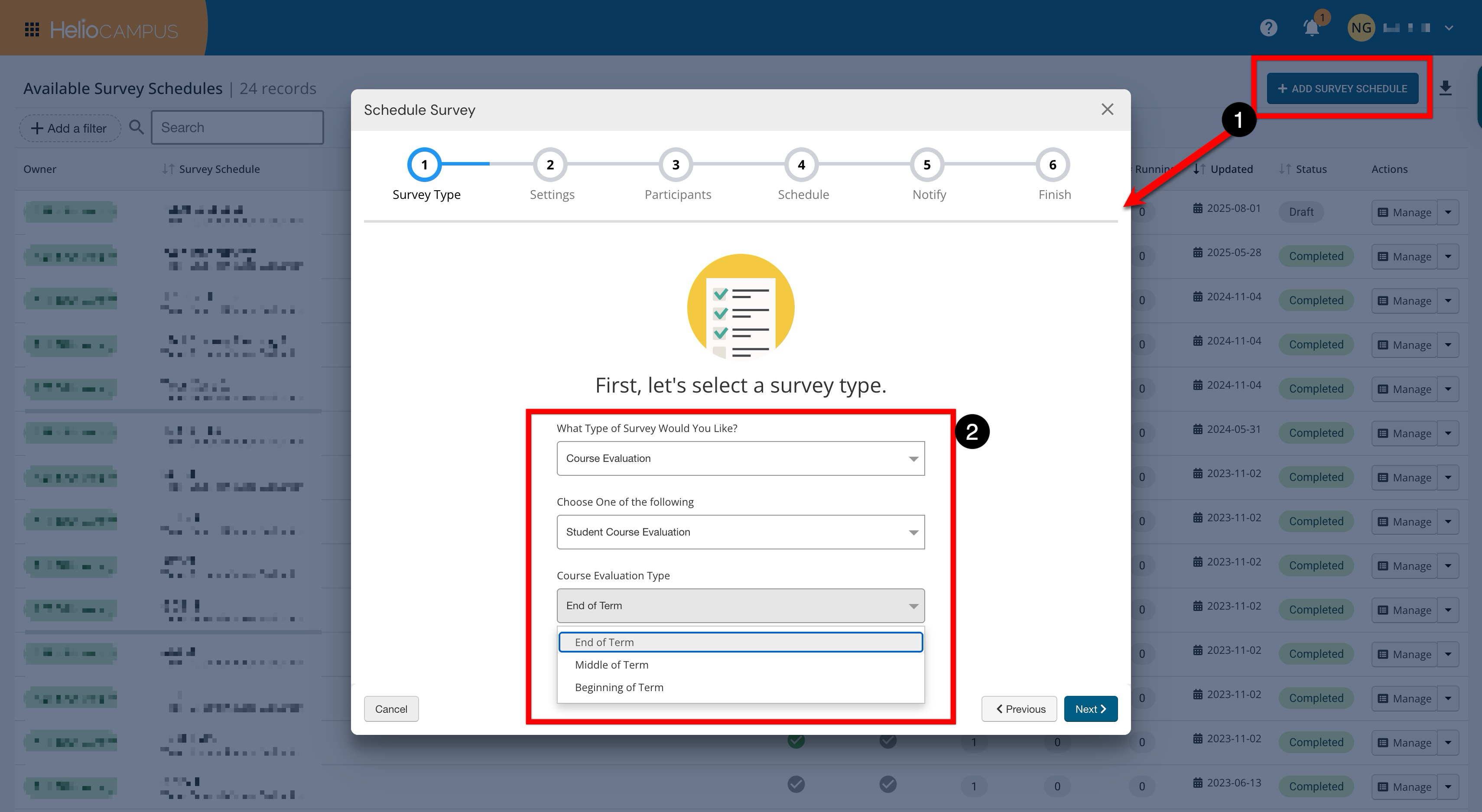
Student Course Evaluations
Student Course Evaluations are surveys administered at the beginning, midpoint, and/or end of a term to collect student feedback on a specific course section. These surveys can be owned/managed by an Institution, College, or Department. Student Course Evaluations can be set to be anonymous for traditional end-of-term course evaluations, or participants can be visible.
Instructor Course Evaluations
Instructor Course Evaluations allow Institutions to gather feedback from faculty about their experience teaching a course section in a particular term. This survey type provides an opportunity for self-assessment, Institution assessment, or both, and cannot be anonymous. These survey types can be scheduled for a one-time use or run every term when a course section is offered.
Product Tip
The platform will generate survey forms only for the Course Section Director and Instructor user roles. Survey forms will not be generated for Teaching Assistants or Preceptors, and no survey invitation notification will be sent to these user types.
General Course Evaluations
General Course Evaluations are surveys administered to target students in particular courses with Survey topics. For example, a popular use of this function is for facility surveys; course sections in a particular campus building could be targeted to ask questions about the quality of the space in their classroom or lab. These survey types can be scheduled for a one-time use or run every term when a Course Section is offered, and can be administered at the beginning.
General Surveys
When scheduling a Course Evaluation survey, the platform provides options for External Group Surveys and Alumni Surveys. For all General survey types, users can navigate to the Survey Schedules page and click Add Survey Schedule (1) to select the survey type and configure it as an External Group Survey or Alumni Survey (2). Learn more.
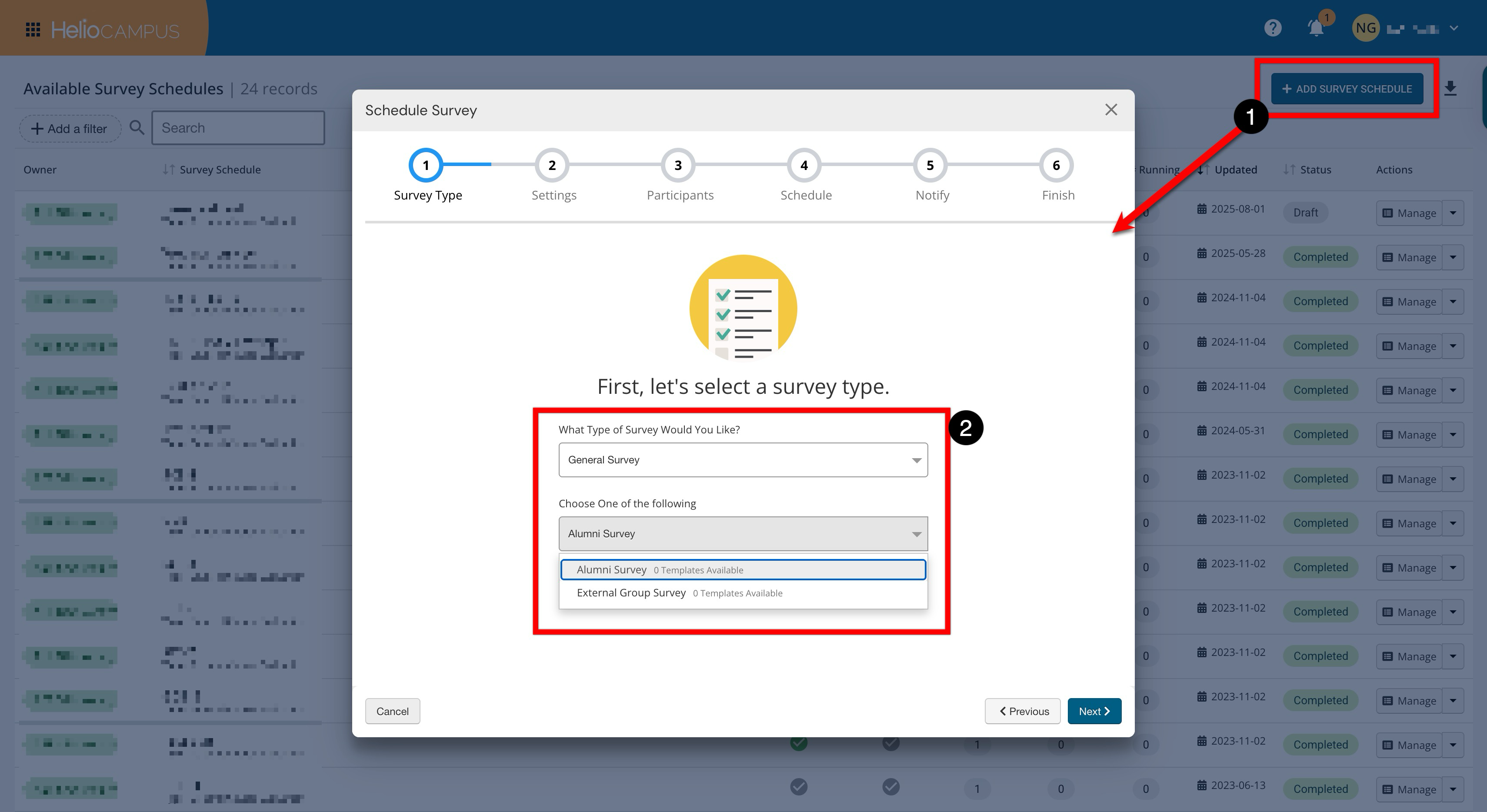
External Group Surveys
External Group surveys are not course- or course-section-based; they are created for user groups within the platform. User groups can contain users with platform accounts, users external to the platform or Institution, or both. This survey type can be scheduled at any time, and no platform account or SSO login is required for survey participants to access the survey form.
Alumni Surveys
Alumni Surveys are intended to collect post-graduate information from former students, typically about their employment and continued education plans. For Alumni Surveys, the Auto Complete Drop-Down question type can be used to add very specific drop-down items, such as job types or salary ranges. This Survey type can be scheduled at any time and is created based on User groups within the platform. User groups can contain users with platform accounts, users external to the platform or Institution, or both. No platform account or SSO login is required for survey participants to access the survey form.