📙 Knowledge Base Tip: Reviewing the Report Library article before utilizing any reports is recommended.
This report provides detailed assessment results organized by individual student. Results are sorted by student last name, and then by course section code. Data is combined from both course-level and program-level assessments to display each student's performance on learning outcomes, whether they met the established goals, and the specific assignments used as evidence for the assessed outcomes. User roles with permissions to utilize this report include:
-
College Admin
-
Course Coordinator
-
Department Admin
-
Institution Admin
Product Tip
Users with Organizational Hierarchy roles (e.g., Institutions Admin, College Admin, etc.) will only see the business objects (colleges, departments, courses, etc.) to which they are associated. For example, College Admins can configure report parameters and view report results only for the course sections associated with the colleges for which they are assigned the admin role.
Use Cases
|
Early Intervention for At-Risk Students |
|
Academic Advisors can use the this report to review student performance by filtering for specific students and the current term. By examining which outcomes students are not meeting and which assignments reveal these gaps, advisors can identifies students that are consistently underperforming on outcomes across multiple courses. The report's combined Course Learning Outcome (CLO) and Program Learning Outcomes (PLO) view helps distinguish between single-course struggles versus broader programmatic challenges. |
|
Accreditation Evidence Compilation |
|
Preparing for accreditation review, a coordinator can use this report to filter graduating seniors and specific PLO)s required by the accreditor. The report shows how each graduate performed on accreditation-mandated outcomes throughout their program, including specific assignments that served as evidence. |
|
Curriculum Revision and Course Sequencing Analysis |
|
Department Chairs leading curriculum revision can use this report to analyze students who completed specific courses over years, focusing on critical thinking and quantitative reasoning outcomes. The report also shows students meeting CLOs in introductory courses but struggling with PLOs in capstone experiences, revealing a gap in skill reinforcement. |
Considerations
-
Assessment data must exist in the platform for either Course (CLO) or Program (PLO) assessments, or both, and students must be enrolled in sections with assessment results recorded.
-
The report has a limit of 2,000 students for viewing results. Start with more restrictive parameters (specific terms, departments, or courses) to avoid hitting the limit. If parameters generate more than 2,000 students, a warning message will display stating to refine parameters or export directly to CSV without viewing results first.
-
The report combines both CLO and PLO assessment data, so understand that a single student may appear multiple times (once per course section, sorted by student last name, then section code).
-
Individual student-level assessment data is displayed in the report. Consider who should have access to exported data, how it will be stored, and ensure that institutional FERPA policies are followed.
Parameters
|
Parameter |
Details |
|---|---|
|
Term |
Required. When selecting terms, select the term(s) for which the data were collected. Multi-select, select all, and deselect all functionality is available. |
|
Optional. These parameters are useful for narrowing results and more easily configuring the Course/Co-Curricular Activity and the Course/Co-Curricular Section parameters. |
|
Show Results of Courses By |
Required. Determines how report results are displayed in the output. When ‘Program' is selected, the optional Program parameter will display for configuration, and only the course data associated with the selected program(s) will be included in the output. When 'Course’ is selected, the Program parameter will not be available. |
|
Program |
Optional. This parameter will only appear when the Show Results of Courses By parameter is set to ‘Program’. This parameter helps narrow results and more easily configure the Course/Co-Curricular Activity and Course/Co-Curricular Section parameters. Multi-select, select all, and deselect all functionality is available. |
|
Optional. These parameters are useful for narrowing results displayed in the report output. Multi-select, select all, and deselect all functionality is available. |
|
Required. The Outcome Set parameter can help narrow the selections available in the Outcomes parameter. Assessment data will only display for outcomes for which data has been collected. Multi-select, select all, and deselect all functionality is available. |
|
Optional. These parameters are useful for narrowing results displayed in the report output. |
|
Hide Selected Parameters in Report Results |
When enabled, the parameters configured for the report results will not be included in the report output. When disabled, parameters and their selections will be included in the report output. |
Report Output
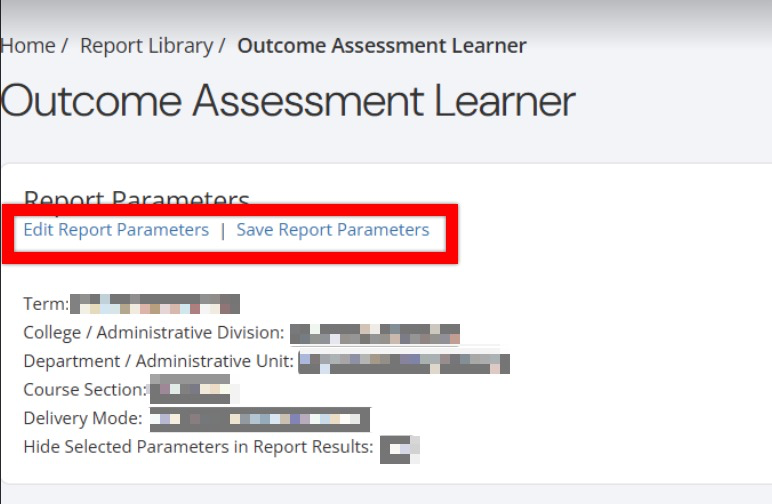
Once report parameters have been configured and Run Report has been clicked, the report output will display below the collapsed read-only view of the report parameters. Clicking Edit Report Parameters will reopen edit capabilities; once parameters have been edited, Run Report can be clicked again to re-generate the report output. Clicking Save Report Parameters will open the Create a New Saved Report pop-up, where the name and description of the new saved report can entered. Once a report has been saved, it will be available via the My Saved Reports tab of the Report Library.
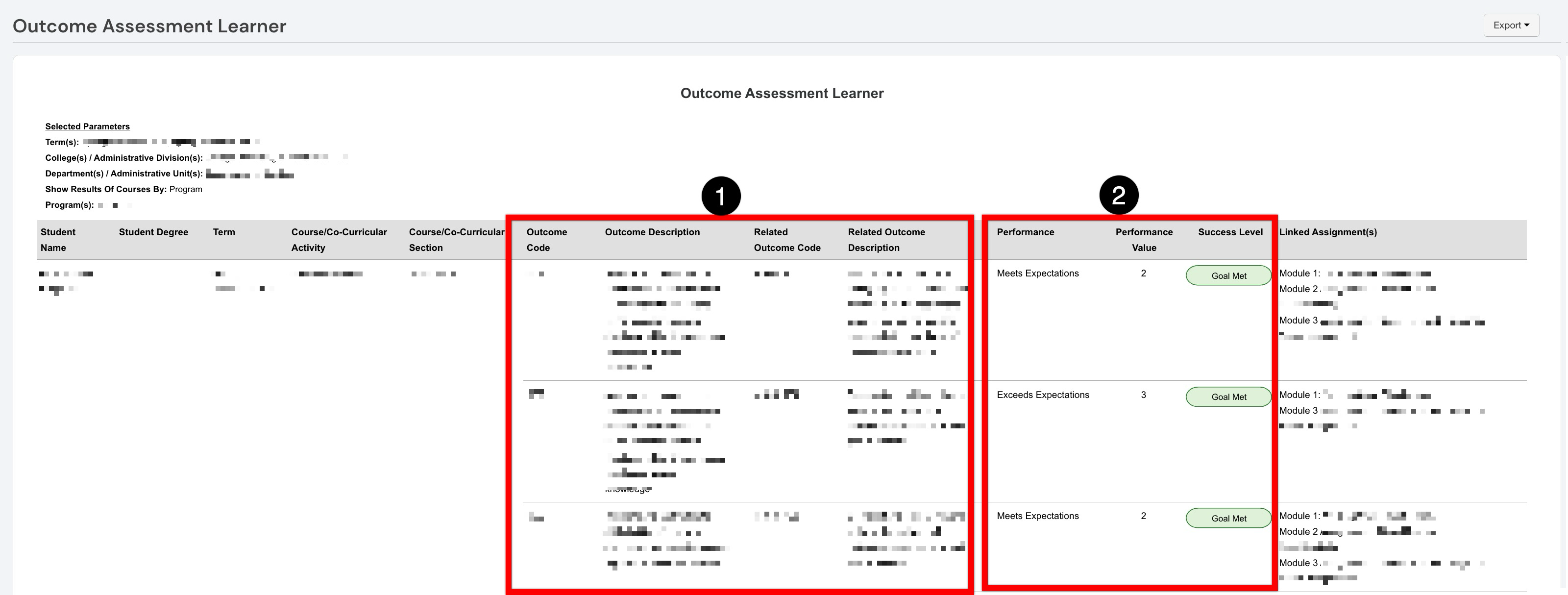
Once generated, the report displays learner-level outcome results for the selected parameters. Each row represents an outcome assessed for a student within the associated course or co-curricular section. The outcome information section displays the code and description for the assessed outcome (1). When the outcome is aligned with another outcome in the hierarchy, the Related Outcome Code and Related Outcome Description identify that relationship and provide context for how the learner’s result contributes to broader outcome assessment. The performance information section displays the learner’s performance classification, the corresponding numeric performance value, and the outcome's success level, displaying a Goal Met or Goal Not Met indicator (2). Performance classifications indicate results such as Meets Expectations or Exceeds Expectations, while the performance value shows the associated proficiency-scale score. The success-level indicator identifies whether the learner’s result satisfied the established goal.