The Interrater Reliability Results report is available only when Interrater Reliability is enabled for Juried Assessment.
This report provides a comprehensive summary of interrater reliability across defined learning outcomes based on juried assessment results. This report displays the aggregated mean of final scores, the mean of all assessor scores, agreement level, standard deviation, sample size, and percentage scored to support reliability review, scoring consistency analysis, accreditation, and institutional effectiveness efforts.
Product Tip
Users with organizational hierarchy roles, such as Institution Admin, College Admin, Department Admin, and Program Coordinator, will only see the business objects they are associated with. For example, College Admins can configure report parameters and view report results only for the programs and Juried Assessments associated with the colleges for which they are assigned the admin role.
Use Cases
|
Reviewing Scoring Consistency Across Assessors |
|---|
|
Validate how consistently multiple assessors scored artifacts for the same learning outcomes. This helps assessment teams identify whether scoring practices are aligned before results are used for program review, accreditation, or improvement planning. |
|
Evaluating Agreement Levels for Reliability Evidence |
|
Use agreement-level values to assess the strength of scoring agreement among assessors. This provides defensible evidence of scoring reliability and helps teams determine where additional calibration may be needed. |
|
Identifying Outcomes or Criteria With Scoring Variability |
|
Compare final score means, all-assessor score means, standard deviations, and sample sizes to identify outcomes or rubric criteria for which scoring results may require closer review. When rubric criteria are included, teams can pinpoint specific areas of scoring variation. |
Considerations
-
Interrater Reliability must be enabled for a Juried Assessment for this report to be available. Only Juried Assessments with Enable Inter-rater Reliability enabled will display in the report parameters.
-
The report is designed for Juried Assessment results and reliability review. It is best used after artifacts have been scored and final scores are available.
-
The Sample Size in the report output includes only evaluations with a final score and matches the Evaluation Count used on the assessment Reliability pages.
-
The Mean of all Assessor Scores in the report output includes all assessor scores, including discordant assignment submission scorings without a final grade.
-
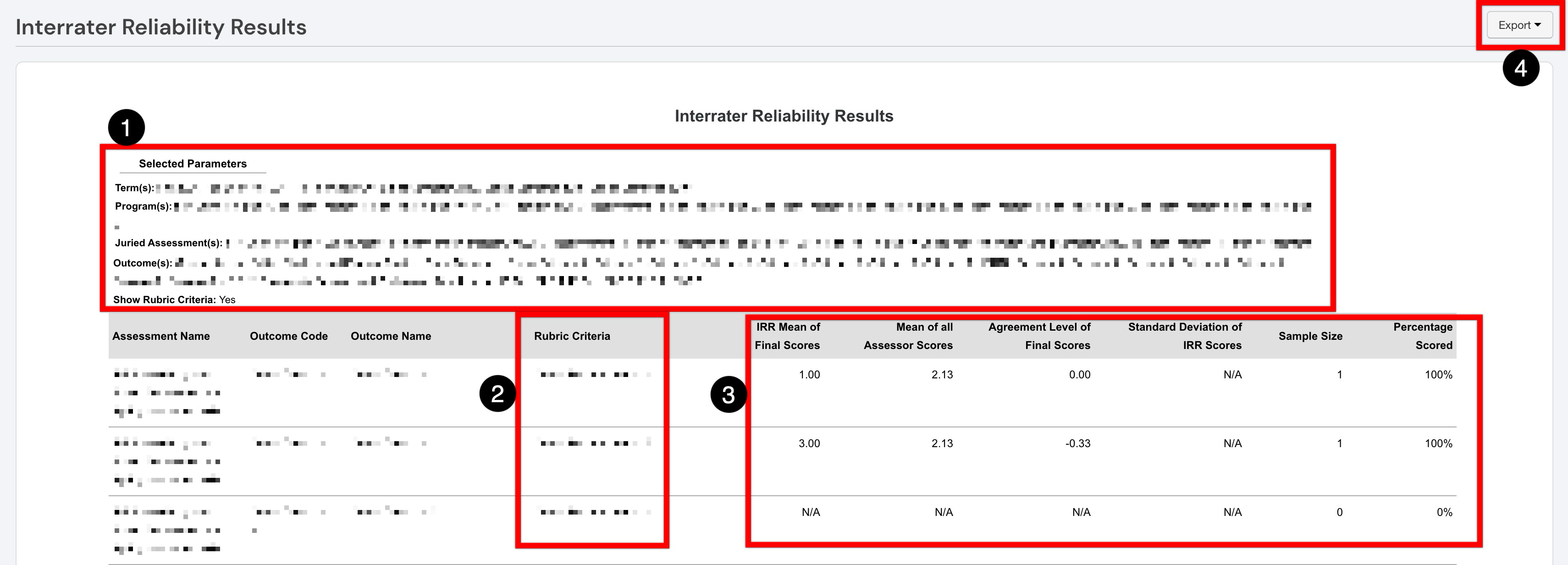
If no scoring data is available for a row, score-based fields in the report output display N/A, while the Sample Size displays 0 and Percentage Scored displays 0%.
-
When Show Rubric Criteria is enabled, each rubric criterion within an outcome displays as a separate row. When disabled, rubric criteria are aggregated into a single outcome-level row.
Parameters
|
Parameter |
Details |
|---|---|
|
Assessment Cycle / Term |
Required. Multiple assessment cycles/terms can be selected. The selection of this parameter affects the options displayed for selection via the Program parameter. Only assessment cycles or terms associated with IRR Juried Assessments will be available for selection. |
|
Program |
Required. The selection of this parameter affects the options displayed for selection via the Juried Assessment parameter. |
|
Juried Assessment |
Required. Only Juried Assessments with Interrater Reliability enabled will display. The selection of this parameter affects the options displayed for selection via the Outcome parameter. |
|
Outcome |
Required. Only outcomes associated with the selected Juried Assessment parameter selections will display. |
|
Educational Experiences |
Optional. This parameter helps narrow results by educational experience. Only options associated with the selected Program, Juried Assessment, and Outcome parameter selections will display. |
|
Show Rubric Criteria |
Optional. When enabled, the report output displays rubric criteria as separate rows within each outcome. When disabled, rubric criteria values are aggregated into outcome-level rows. |
|
Hide Selected Parameters in Report Results |
Optional. When enabled, parameters configured for the report results will be excluded from the report output. When disabled, parameters and their selections will be included in the report output. |
Report Output
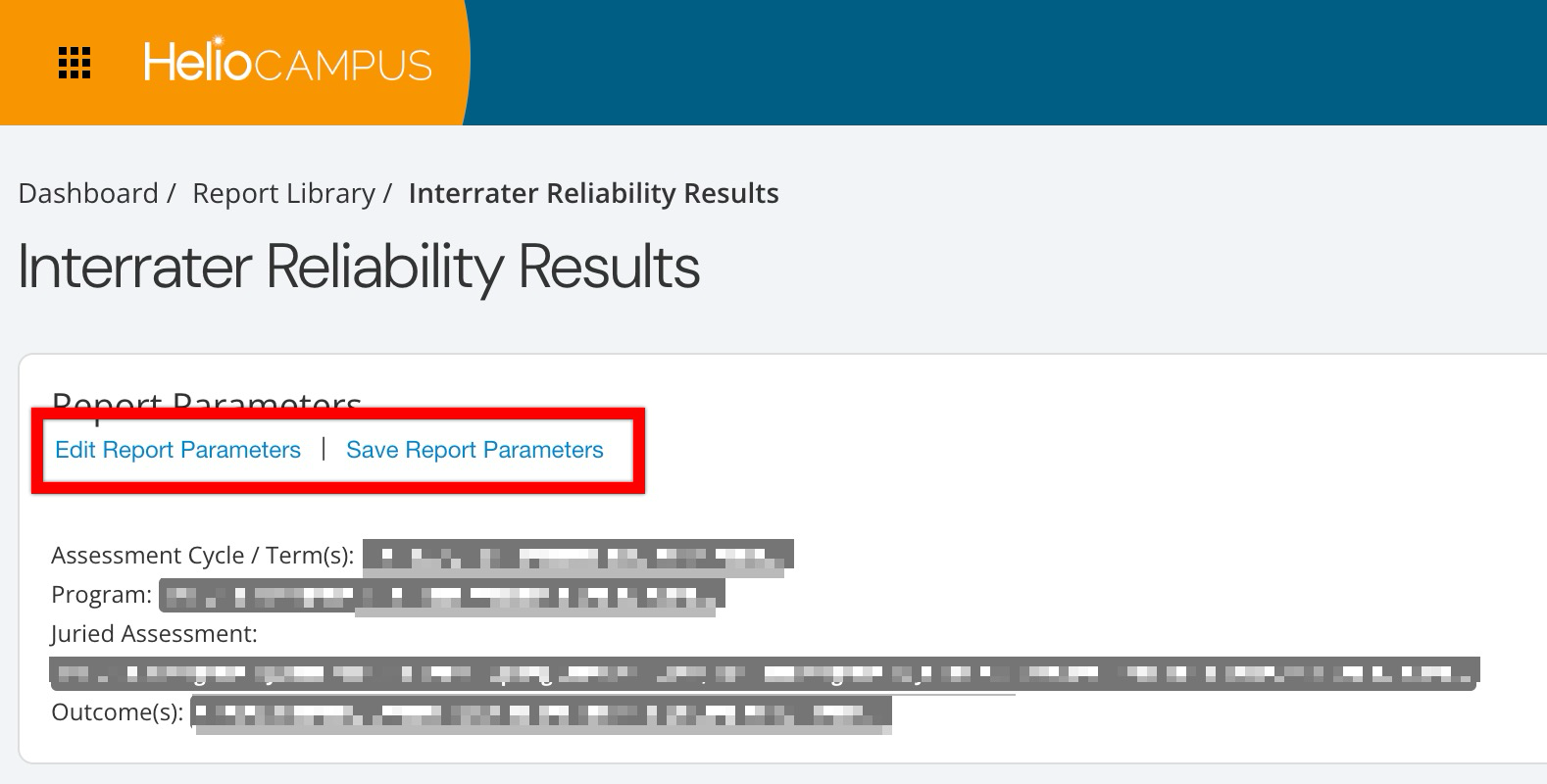
Once report parameters have been configured and Run Report has been clicked, the report output will display below the collapsed, read-only view of the report parameters. Clicking Edit Report Parameters will reopen the parameter editing capabilities. Once parameters have been edited, clicking Run Report again will regenerate the report output with the edited parameters. Clicking Save Report Parameters will open the Create a New Saved Report pop-up, where the name and description can be entered. Once a report has been saved, it will be available via the My Saved Reports tab in the Report Library.
Once generated, parameters and their selections will display above the report output if Hide Selected Parameters in Report Results is disabled (1). If Show Rubric Criteria (2) is enabled, the rubric criteria used for scoring will also display. For each outcome or rubric criterion, the report displays the IRR mean of final scores, the mean of all assessor scores, the agreement level of final scores, the standard deviation of IRR scores, the sample size, and the percentage scored (3). The report output can be printed or exported to CSV, Excel, PDF, or Word formats (4).