
Data collection helps Institutions gather structured information from selected participants in a consistent, trackable workflow. Institutions commonly use them to request updates, narrative responses, evidence, or form-based inputs from departments, programs, committees, faculty, or other designated contributors. Unlike one-time spreadsheets or email-based requests, the Data Collections feature centralizes participation, due dates, response status, notifications, and reporting in one place. This makes it easier to manage recurring institutional processes and improve completion rates. Some key benefits of using data collections include:
-
Standardizes institutional data gathering
-
Improves visibility into participation and completion
-
Reduces manual follow-up and version control issues
-
Supports recurring cycles and repeatable processes
-
Provides cleaner data for reporting and downstream analysis
Data collections are most useful when an Institution needs a structured, repeatable way to gather information from multiple contributors. They are best suited for information that requires narrative input, confirmation, reflection, or locally maintained details rather than data that should be automatically sourced from an existing feed.
Use Cases
|
Collecting Annual or Periodic Program Updates |
|
An Institution needs a reliable way to collect annual or periodic program updates without relying on scattered emails, spreadsheets, or one-off documents. This is especially relevant when many programs must report on similar information on a recurring cycle, such as curriculum changes, enrollment context, faculty updates, assessment activity, or progress toward prior goals. |
|
Gathering Assessment Reflections or Action Plans |
|
An Institution needs a structured way for programs, departments, or instructors to reflect on assessment results and document planned improvements. This practice often follows the close of an assessment cycle, rubric scoring period, or annual outcomes review. |
|
Capturing Accreditation-Related Narrative Responses |
|
An Institution requires narrative responses that support accreditation, program review, or external accountability requirements. This can be triggered by self-study preparation, interim monitoring reports, specialized accreditation cycles, or requests for evidence tied to standards and criteria. |
First Time Implementation Process
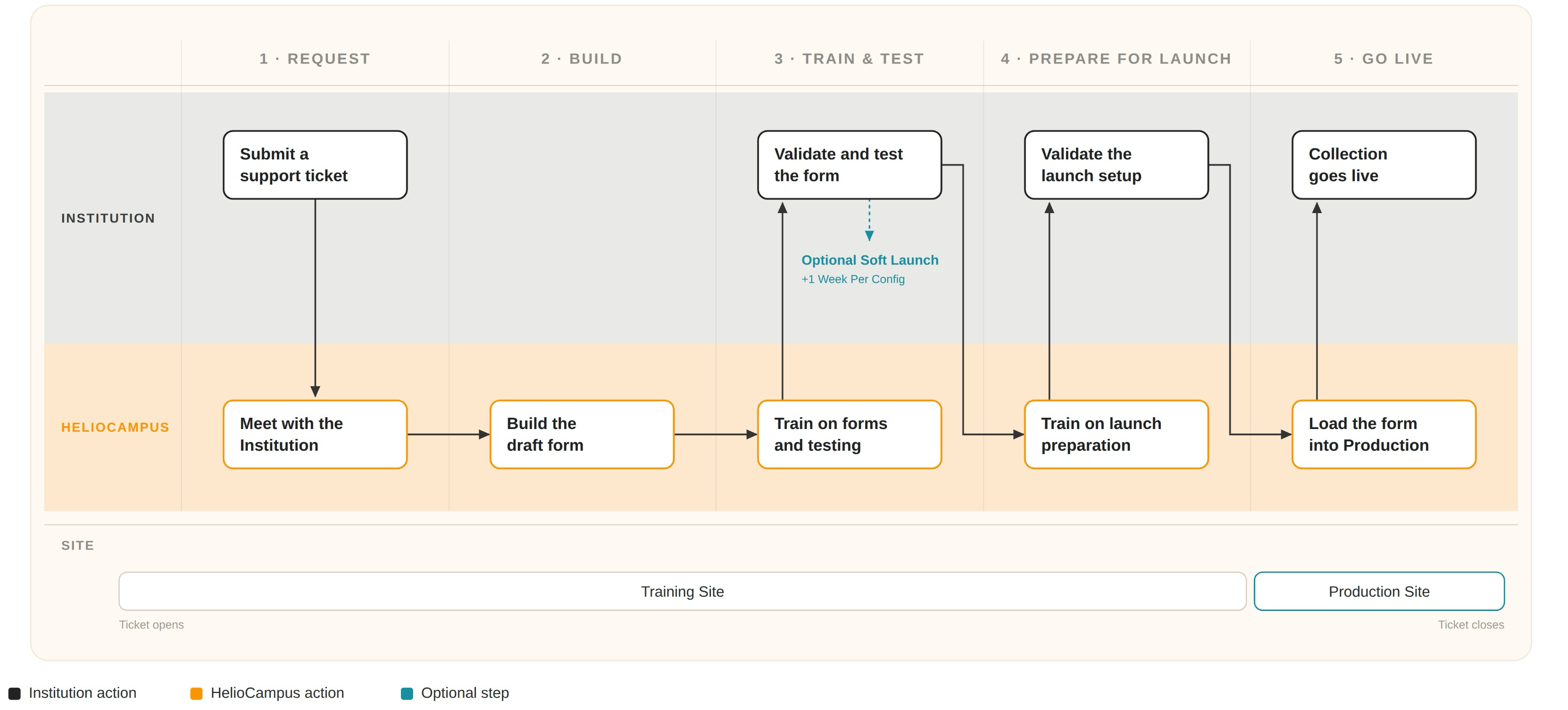
For Institutions using the Data Collection feature for the first time, implementation can take a minimum of three months. This ensures adequate time for form configuration and validation, as well as related training for the Institution.
-
The Institution submits a Support ticket requesting data collection. Learn more.
-
HelioCampus will meet with the Institution to provide an overview of the Data Collection feature and discuss collection specifications. In this part of the process, HelioCampus and the Institution will discuss goals, scope, data needs, and required documentation.
-
-
HelioCampus will configure and build a draft form in the Institution’s Training Site.
-
HelioCampus provides training to the Institution:
-
Logging in as a user
-
Form features
-
Testing draft forms in the Institution’s Training Site
-
-
The collection is validated and tested in the Institution’s Training Site to ensure the form meets the Institution's needs.
-
As part of testing, a soft-launch can be configured to review how the data collection functionality works in real time. Each soft-launch configuration adds one week to the timeline.
-
-
HelioCampus provides training to the Institution:
-
Preparing the form for the Production Site
-
Managing a collection before launching to the Production Site.
-
-
The Institution will validate the configurations, schedule, workflow, and template details in preparation for the Production Site
-
After successfully validating the collection in the Training Site, HelioCampus will load the finalized data collection into the Production Site.
-
After the collection changes to In Progress status, the data collection is live, and the Support ticket will be closed.
*Timelines can vary based on project scope
Repeat Data Collections Process
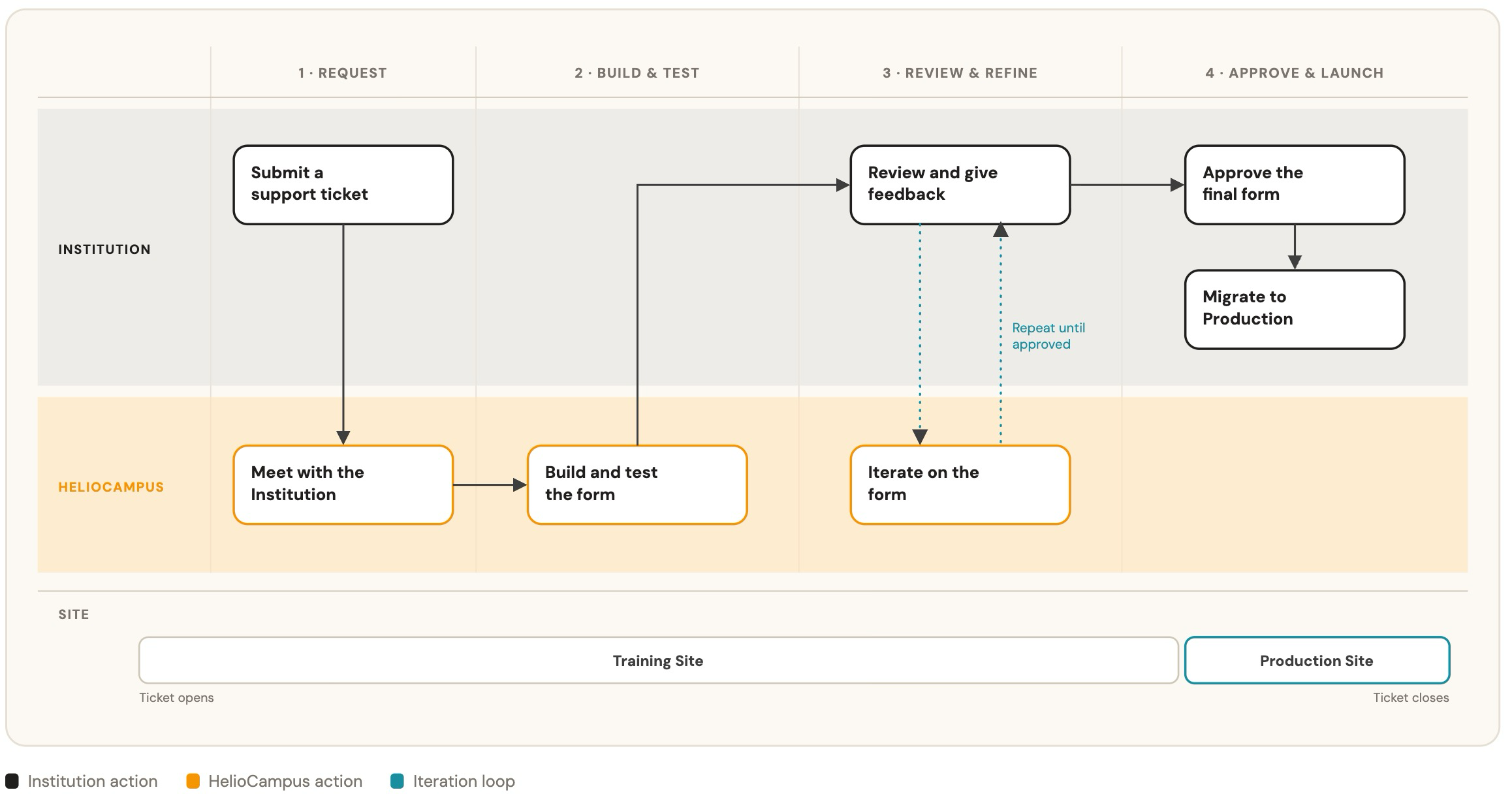
For Institutions administering repeat data collections, implementation can take up to one month. This ensures adequate time for form configuration and validation per the Institution requirements.
-
The Institution submits a Support ticket requesting data collection. Learn more.
-
HelioCampus will meet with the Institution to discuss collection specifications
-
-
HelioCampus will configure and build a draft form in the Institution’s Training Site and provide a link for Institutional review.
-
Internal testing of the form, workflow, and schedule elements ensures successful collection of the intended data.
-
-
The Institution will then submit feedback on the form so HelioCampus can iterate on the data collection until it meets the Institution's requirements.
-
Once all revisions are complete, the Institution will approve the form, then migrate the template and workflow to the Institution’s Production Site.
*Timelines can vary based on project scope
Considerations
-
Collection Scope and Scale: Before using a data collection, Institutions should determine whether they need to collect a small set of responses from a limited group or a large volume of submissions across many areas of the organizational hierarchy.
-
Recurring Collection Needs: Institutions should consider whether the information is needed one time or on a recurring cycle, such as annually, each term, or during a scheduled assessment period.
-
Source of Truth: Institutions should identify whether users should enter the requested information manually or whether it already exists in another system, such as an SIS, LMS, or governed institutional dataset.
-
Timing and Deadlines: Institutions should consider whether the collection is tied to a fixed deadline, mid-cycle update, accreditation submission, annual report, or term-based review. Data collections require enough lead time for contributors to respond, reviewers to follow up, and administrators to prepare results for reporting.
-
Contributor Readiness: Institutions should confirm that contributors understand what information is being requested, why it is needed, and how their responses will be used. Clear prompts, instructions, and due dates can reduce incomplete responses and help ensure responses are consistent enough for review.
-
Governance and Review Process: Institutions should decide who is responsible for monitoring the collection, monitoring submissions, reviewing responses, and determining whether follow-up is needed. This is especially important when responses affect institutional reporting, accreditation evidence, or official program records.
-
Data Consistency: Institutions should consider how much structure the response format needs. Open-ended narrative prompts may be appropriate for reflection or accreditation context, while more standardized prompts may be needed when responses must be compared, aggregated, or reported across multiple units.
-
Access and Visibility: Institutions should determine who can view, submit, edit, or review responses. Access decisions should align with the sensitivity of the information being collected and whether responses are intended for program-level use, institutional oversight, or external reporting.
Data Collection Types
|
Type |
Details |
|---|---|
|
Administrative Division |
Collect planning, assessment, or review information separately from each administrative division. This type supports institutional effectiveness reporting, annual division reviews, operational goal tracking, and documenting each division’s progress toward strategic priorities. A separate form can be generated for each included division. |
|
Administrative Unit |
Collect planning and reporting information from individual administrative or non-academic units. Common uses include annual unit assessment, operational effectiveness reviews, resource planning, goal tracking, and documenting improvements. Forms can be routed through reviewers associated with the applicable unit or its parent division. |
|
College |
Collect information separately from each college or school. Use this type for college-level annual reviews, academic planning, accreditation reporting, strategic-goal updates, resource evaluation, or summaries of program and student-learning performance. |
|
Course |
Evaluate and improve a course across offerings or review cycles. Course Data Collections are well suited for curriculum review, course assessment planning, reviewing Course Learning Outcomes, documenting assessment methods and results, and identifying course-level improvements. |
|
Course Section |
Collect assessment and improvement information for individual course sections. This type is useful when responses need to reflect the section’s instructor, term, learning outcomes, assessment results, or survey results. Common uses include section-level assessment reporting, reflection on teaching practices, and documenting planned improvements. |
|
Department |
Collect planning, assessment, or review information separately from each department. Typical uses include department annual reports, academic or administrative program review, operational effectiveness reporting, strategic-plan updates, self-study review, and documenting follow-up on recommendations. |
|
Faculty Activity |
Support faculty-centered review processes by generating a separate form for each faculty member. Common uses include annual faculty review, promotion and tenure, workload or professional-development reflection, and submission of narratives or supporting evidence. The workflow can include department-, college-, and institution-level reviewers. |
|
Institution |
Use for a centralized, institution-wide collection when the information is not intended to be separated by college, department, program, or another organizational entity. Potential uses include institutional self-studies, accreditation evidence collection, enterprise initiatives, and institution-level strategic reporting. |
|
Program |
Collect assessment, planning, and review information separately from each academic or administrative program. Use this type when forms need to reference Program Learning Outcomes or associated outcome sets. Common uses include annual assessment planning and reporting, program review, accreditation evidence, outcome analysis, and documenting improvement actions. |
|
Strategic Plan |
Collect information within the context of the complete strategic-plan hierarchy. Use this type when contributors need visibility into the overall plan while reporting on their assigned areas. Forms are generated for individual users, allowing multiple contributors to support institution-wide strategic-plan reporting without working in one shared form. |
|
Strategic Plan Objective |
Collect progress, evidence, results, and planned actions separately for individual strategic-plan objectives. Use this type when responsibility is assigned by objective, and each objective needs its own reporting and review workflow. It is well suited for periodic progress updates, resource requests, results reporting, and documenting next steps. |
|
User |
Supports a limited, person-specific collection workflow associated with Continuous Practicum use cases, such as submitting feedback or practicum-related information for an individual student. |
Data Collection Participants
Keep the participant experience as simple as possible. Data collections with clear instructions, focused questions, and realistic due dates tend to achieve stronger completion rates.
|
Participant |
What They Usually Do |
|---|---|
|
Administrator |
This responsibility is usually limited to institutional administrators. These participants assign participants, manage settings, and monitor progress. *Initial configuration and form building is completed by HelioCampus Administrators |
|
Contributor |
These participants may be faculty, staff, department leads, committee representatives, etc. They are responsible for completing assigned forms and tasks and will have access to past results from the forms they have submitted. |
|
Reviewer |
While not every data collection includes this role, a reviewer reviews submitted information when the collection includes a review step. |
|
Institutional Stakeholder |
These participants may not directly participate in the workflow, although they consume results, exports, or summaries. |
Data Collection Ownership
Separate from the users involved in a collection workflow, the owner is the organizational division that owns the collection. The owner can perform managerial collection actions such as defining the start and end dates, managing assignments, setting up collection notifications, tracking collection progress, and reviewing submissions.
Institutions may choose to have colleges or departments own a collection if they are the only unit in the hierarchy completing the collection’s forms. This structure/ownership allows the college or department autonomy to manage collection forms and results as needed, without required support from an Institution Admin.
Institutions should not assign a college or department as the owner of a collection if more than one college or department will be using the collection.
|
If |
Then |
|---|---|
|
A Data Collection is owned by an Institution |
The Institution owns it; Institution Admins have managerial permissions. |
|
A Data Collection is owned by a College |
The college owns it; Institution and College Admins have managerial permissions. |
|
A Data Collection is owned by a Department |
The department owns it; Institution, College, and Department Admins have managerial permissions. |
User Role Access
|
Institution Admin |
|
|
Platform Access:
|
Edit Access: Details for all collections:
Schedule details for all collection schedules:
|
|
College Admin |
|
|
Platform Access:
|
Edit Access: Details for all collections owned by the college or associated departments:
|
|
Department Admin |
|
|
Platform Access:
|
Edit Access: Details for all collections owned by the department:
|
The following roles will see data collection forms assigned to them via Action Items and the My Data Collection Forms and My Forms dashboard widgets. If a user with one of the following user roles also owns a collection form, they will see the completed form via the Completed Forms dashboard widget.
-
College Committee
-
Course Section Director
-
Department Committee
-
Graduate College Committee
-
Institution Committee
-
Program Coordinator
-
Provost Office
-
Students
The following user roles have access to the Data Collection Manager and can run reports for forms they can access based on the form's College or Department ownership.
-
Assessment Office
-
College Academic Liaison
-
Course Academic Liaison
-
Course Coordinator
-
Curriculum Office
-
Dean
-
Department Academic Liaison
-
Graduate College Academic Liaison
-
Graduate College Admin
-
Graduate Dean