
Assignments are the evidence source for learning outcome assessment. The type of assignment primarily determines where the student artifact comes from, how scoring is conducted, and which milestone dates apply. In the platform, there are three assignment types:
-
Student Submission: Valuable when Institutions need a consistent process for artifact collection. This is especially helpful when artifacts may not be reliably stored in a Learning Management System (LMS). Students are expected to provide artifacts in-platform, which typically increases reliance on notifications, deadlines, and clear instructions. Assignments can be linked and used as evidence in analytics and assignment-related reports.
-
No Submission: Valuable when rubric-based scoring is needed without collecting artifacts. This submission type works well for observational assessments because it eliminates the need for students to upload artifacts; examples include observing a presentation, performance, practicum, or demonstration. This type is scored based on observation and can be scored directly in the platform’s scorebook or via a platform template import/export process.
-
Import Scores: Valuable when faculty already have a well-defined scoring process outside of the platform, but an Institution wants the platform to be the central repository for outcome results. This submission type is designed for workflows where assessment scores are imported through a platform template export/import process rather than collected/scored artifacts in the platform.
Managing assignments in the platform starts with understanding the difference between templates and section-level assignments. Together, templates and section assignments help balance centralized standards with the flexibility needed at the section level.
-
Key Assignment Templates: By incorporating rubrics and milestones, key assignments created with the Key Assignment Designer help to clarify expectations and progress for students and faculty. Key assignments are reusable templates aligned with specific objectives that cascade to the course and co-curricular activity levels. Learn more.
-
Course and Activity Assignment Templates: Establish reusable assignment structures that cascade to associated sections, supporting standardized assessment and reporting. Learn more.
-
Section Assignments: Course section and co-curricular section assignments are live assignment records that capture evidence for assessment workflows and scoring. Learn more.
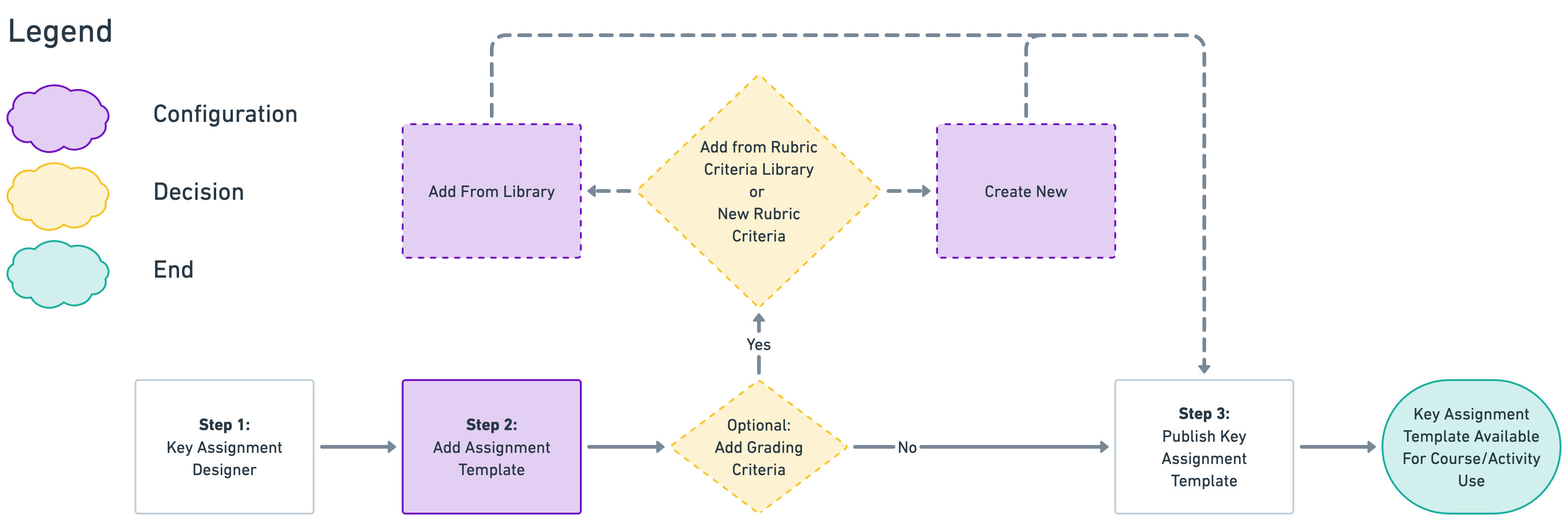
Key Assignment Template Process
-
Admin or Program Coordinator: Creation of a Key Assignment.
-
Create a key assignment template. Learn more.
-
-
Define Rubric Criteria For Assignment Assessment. Learn more.
-
Add from the Rubric Criteria Library, or
-
Create new rubric criteria.
-
-
Publish Key Assignment Template.
Course and Activity Assignment Templates Process
-
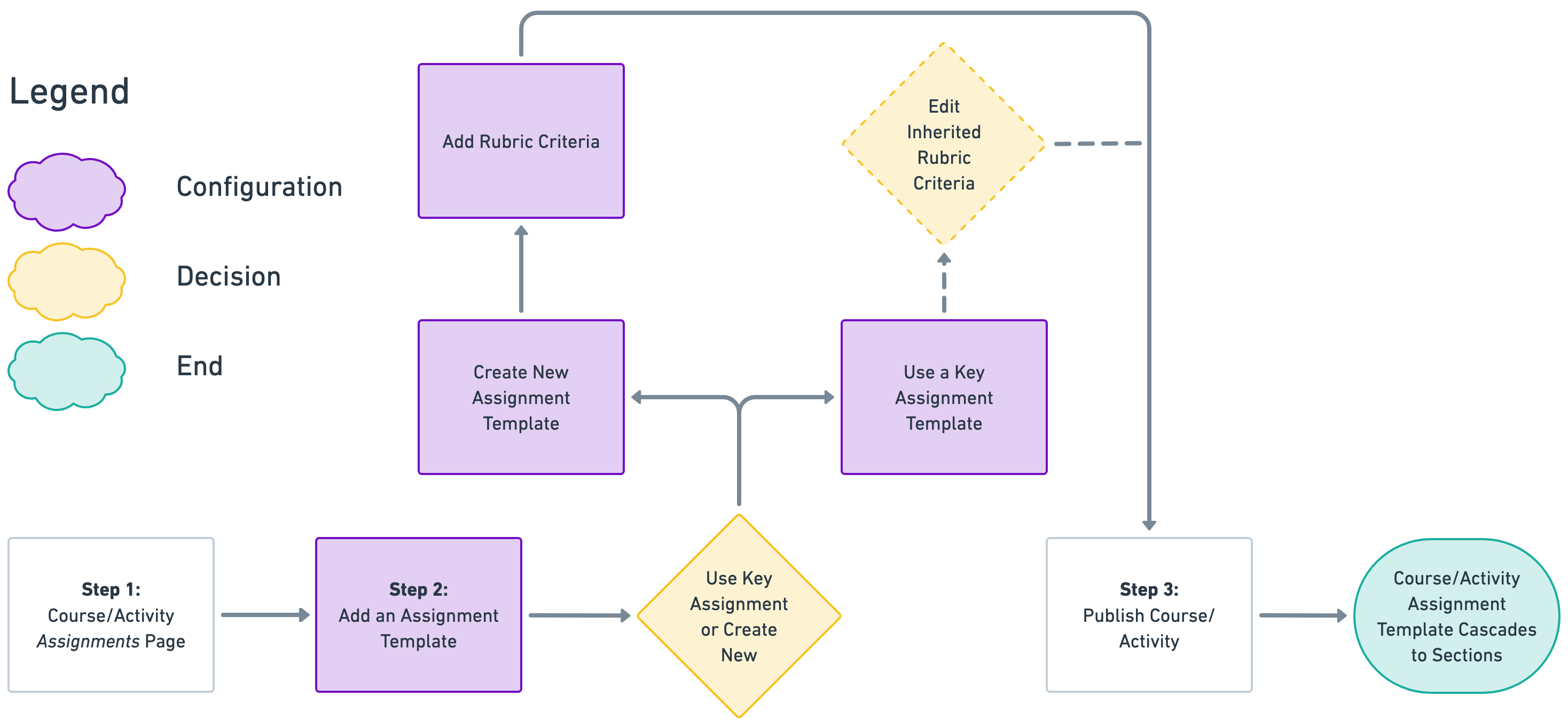
Admin or Course Coordinator: Creation of an Assignment Template. Learn more.
-
Adding a new template, or
-
Using a key assignment as a new template.
-
-
Define Rubric Criteria for Assessment. Learn more.
-
Publish Course/Activity.
Section Assignment Process
-
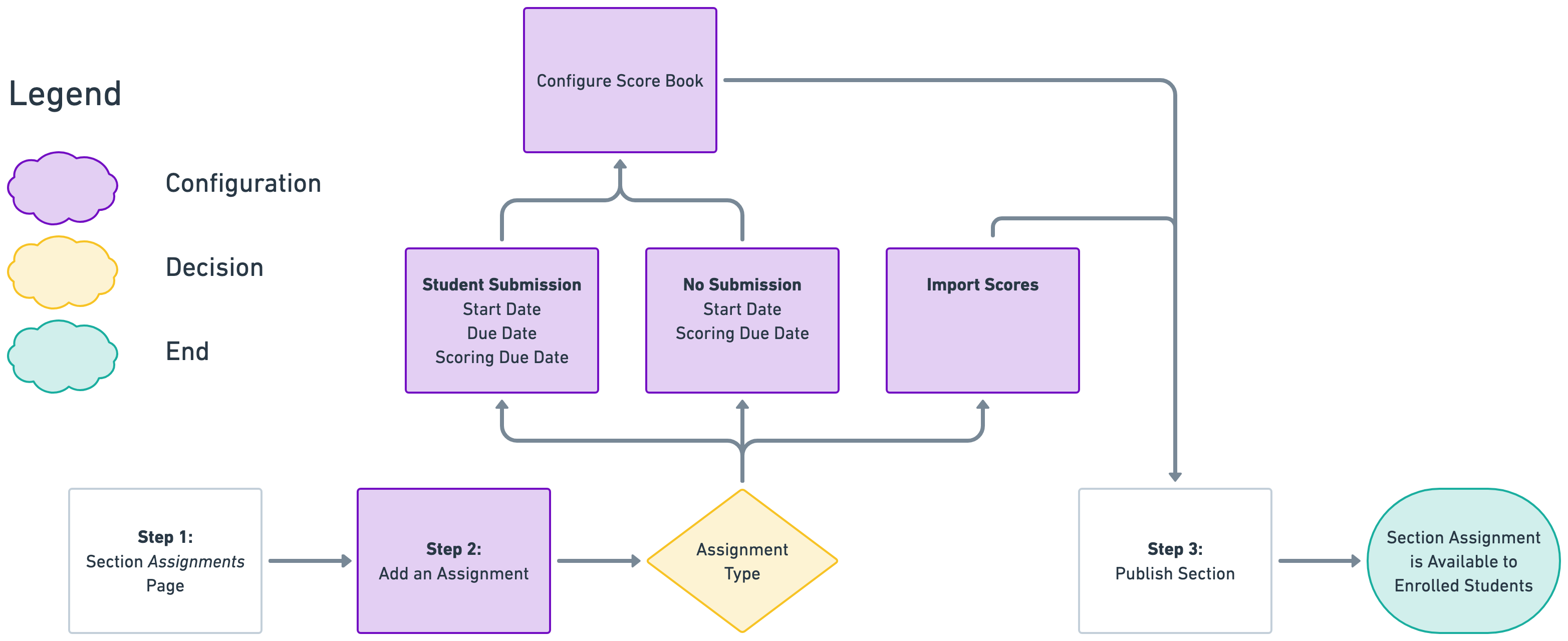
Section Assignment Creation. Learn more.
-
Define Rubric Criteria for Assessment.
-
Publish Section.
User Role Access & Permissions
|
Key Assignment Templates |
|
|---|---|
|
Key assignments are reusable templates aligned with specific objectives that cascade for application at the course and co-curricular activity levels. Learn more. |
|
Course and Activity Assignment Templates |
|
|
Reusable assignment structures that can be used consistently across sections, supporting standardized assessment and reporting. Learn more. |
|
Section Assignments |
|
|
Section assignments are the live assignment records where evidence is captured for assessment workflows and scoring. Learn more. |
|
Refreshing LMS Assignments |
|
|
The platform refreshes the LMS assignments automatically when at least one assignment is linked in the section. If there are no linked assignments, a manual refresh of LMS assignments can be performed. Learn more. |
Administrator Touch Points
|
Touch Point |
Action |
|---|---|
|
Main Menu > Key Assignment Designer |
Key assignment template creation |
|
Key Assignment Homepage > Grading Criteria |
Adding rubric criteria to key assignment templates. |
|
Course/activity assignment template creation |
|
Section assignment creation |
|
Main Menu > Assignment Linking Manager |
Refresh assignment links |
Faculty Touch Points
|
Touch Point |
Action |
|---|---|
|
Section assignment creation |
|
Assignment scoring |
|
Main Menu > Assignment Linking Manager |
Refresh assignment links |
Considerations
-
Workflow Intent: Define the Institution initiatives with assignments in the platform (standardized outcome evidence, consistent scoring, reporting consistency, or all of the above), so templates and section assignments are built to support them.
-
Template Design Standards: Establish naming conventions, assignment-type usage expectations, and rubric criteria for course and activity assignment templates to avoid inconsistent templates.
-
Sustainable Governance: Decide who will maintain templates over time (and at which level), since templates can be added, edited, and removed through role-dependent actions.
-
Section Approach: Confirm whether section assignments will be scored on the platform (Student Submission or No Submission) or imported (Import Scores), as this choice affects how work is completed during the term and what is expected of faculty and students.
-
Assessment Readiness: Validate that the planned assignment strategy supports the Institution’s approach to assignment linking and outcome assessment, since templates and section assignments often feed directly into downstream reporting.
Best Practices
-
Standardize course and activity assignment templates so sections are scored consistently on rubric criteria, and so the template’s name, description, type, and max score remain comparable across sections and terms.
-
Keep template maintenance centralized to the roles that can reliably add and edit templates (Institution Admin, College Admin, Department Admin, Course Coordinator) to avoid “shadow” template versions created in different places due to insufficient role access.
-
Prefer section-level execution for term-specific work, since assignments are ultimately scored and managed in the section context where the students, artifacts, and scoring activity live.
-
Choose the section assignment workflow intentionally (scorebook scoring vs. importing scores), and document the Institution’s standard approach so scoring work is repeatable term to term.
Supporting Articles
|
Article |
Content |
|---|---|
|
Designer manager, homepage, and status overviews. |
|
|
Creating and editing a key assignment. |
|
|
Configuring key assignment, grading criteria, and rubrics. |
|
|
Creation of assignment templates and using a key assignment as an assignment template. |
|
|
Creation of section-level assignments and assignment scoring. |