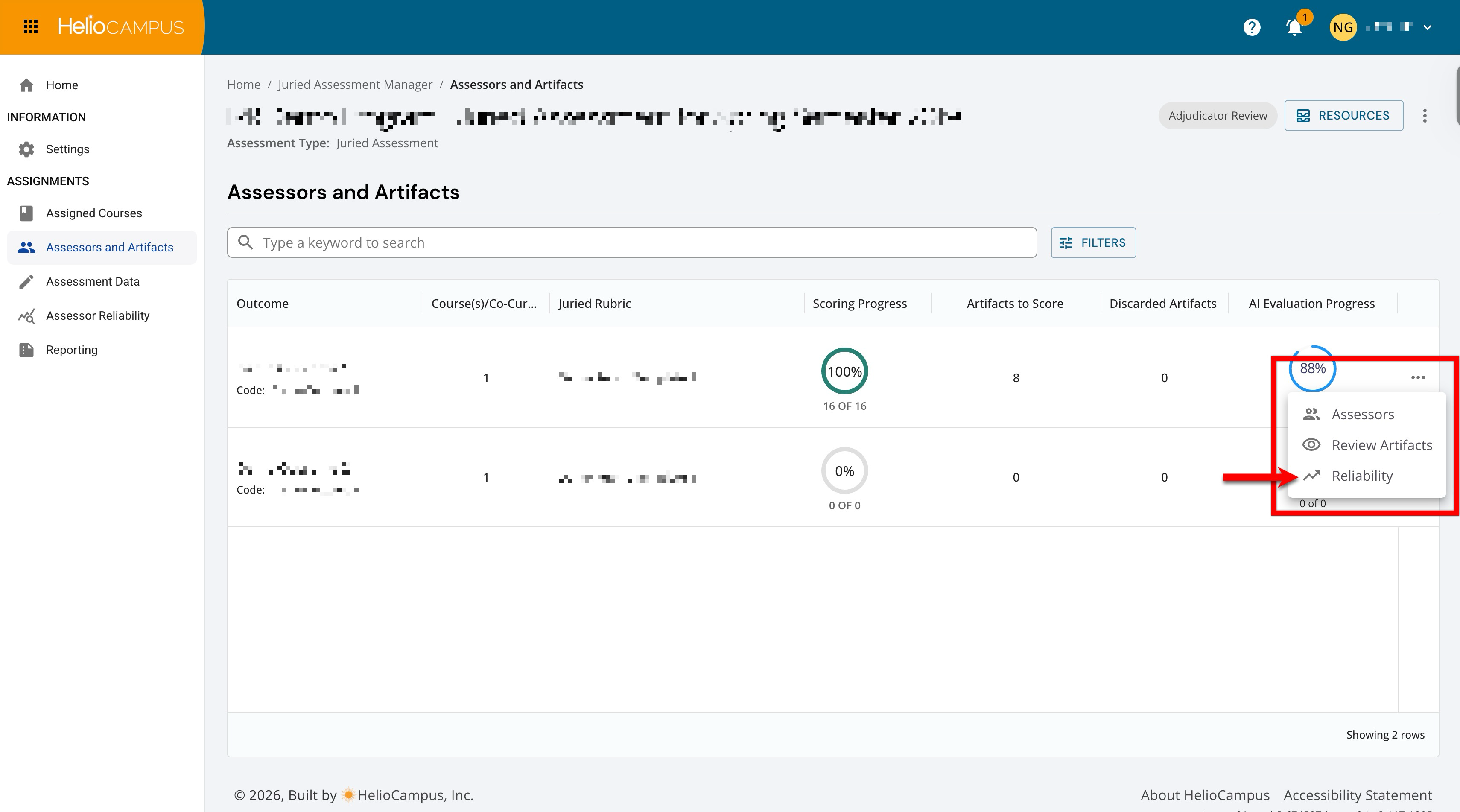
When Inter-Rater Reliability is enabled, reliability metrics can be accessed from the Assessors and Artifacts page. The Reliability page is an analytics view within a Juried Assessment. It does not create or store its own records; it reads the scores that assessors submit for an outcome's artifacts. This functionality interacts with juried rubrics, assessors, artifact scoring, assessor reliability, and reporting by reading scoring data and presenting agreement and proficiency analytics. This page computes IRR (displayed as weighted kappa (κ)), a statistic that compares the scoring agreement assessors reach to the IRR agreement policy, giving partial credit when assessors land on adjacent rubric levels.
Use Cases
|
Identify Assessors Who Need Calibration |
|
When an assessment includes new or infrequent raters, some assessors may apply the rubric differently from their peers. Leaving this unaddressed undermines the credibility of the results. Reliability surfaces a count of jurors flagged for lead intervention or calibration review. This can be used to decide who needs a follow-up conversation before scoring continues. |
|
Demonstrate Defensibility for Accreditation |
|
Institutions preparing for program review or accreditation must show that their assessment results are trustworthy. Reviewers increasingly expect evidence of scoring consistency, not just final scores. Reliability provides a recognized agreement statistic and a record of how agreement evolved across the cycle. This gives Institutions ready evidence that juried results are methodologically sound. |
|
Compare Human Scoring Against AI Assistance |
|
A program piloting AI-assisted scoring seeks a neutral calibration benchmark without allowing AI to grade students. When AI Analysis is enabled, Reliability overlays AI "shadow" agreement alongside human agreement and reports system alignment. This helps identify where human raters and the AI diverge as an additional calibration signal. The AI never replaces human scores; it serves only as a point of comparison. |
Considerations
-
Requires Double-Scored Artifacts: Kappa needs more than one assessor's rating on the same artifacts; agreement cannot be computed where artifacts are single-scored.
-
Small Samples Are Volatile: With few completed artifacts, kappa can swing sharply and even read negative; interpret early-cycle values cautiously.
-
Weighted Kappa, Not Percent Agreement: Values are corrected for chance, so they are typically lower than a raw "percent agreed" and should not be compared to one.
-
AI is a Reference, Not a Grader: AI shadow values are a calibration comparison only and never determine student scores.
Downstream & Cross-Platform Impacts
-
Reporting and Exports: The same reliability data feeds the assessment's Assessor Reliability and Reporting pages, enabling IRR to surface reliability beyond this single view.
-
Evaluation Readiness: Reliability evidence strengthens the defensibility of juried results used in program evaluation, accreditation, and continuous-improvement reporting.
-
Outcomes Transparency: Agreement is reported per rubric criterion, making it visible which parts of an outcome's rubric are scored consistently.
-
AI Evaluation: When AI Analysis is enabled, AI shadow scoring appears throughout reliability analytics as a comparison reference and contributes to the System Agreement figure.
Best Practices
-
Check reliability periodically during scoring rather than only at the end, so there is time to act on low agreement.
-
When the overall kappa is low, use Rubric Alignment to isolate the weakest criteria and target calibration there.
-
Treat the Integrity Status count as a prompt for individual juror conversations, not as an automatic judgment.
-
Look at the Reliability Health trend, not just the current value; improving agreement over the window is the signal that calibration is working.
-
Confirm enough artifacts are double-scored before relying on the numbers.
User Role Access and Permissions
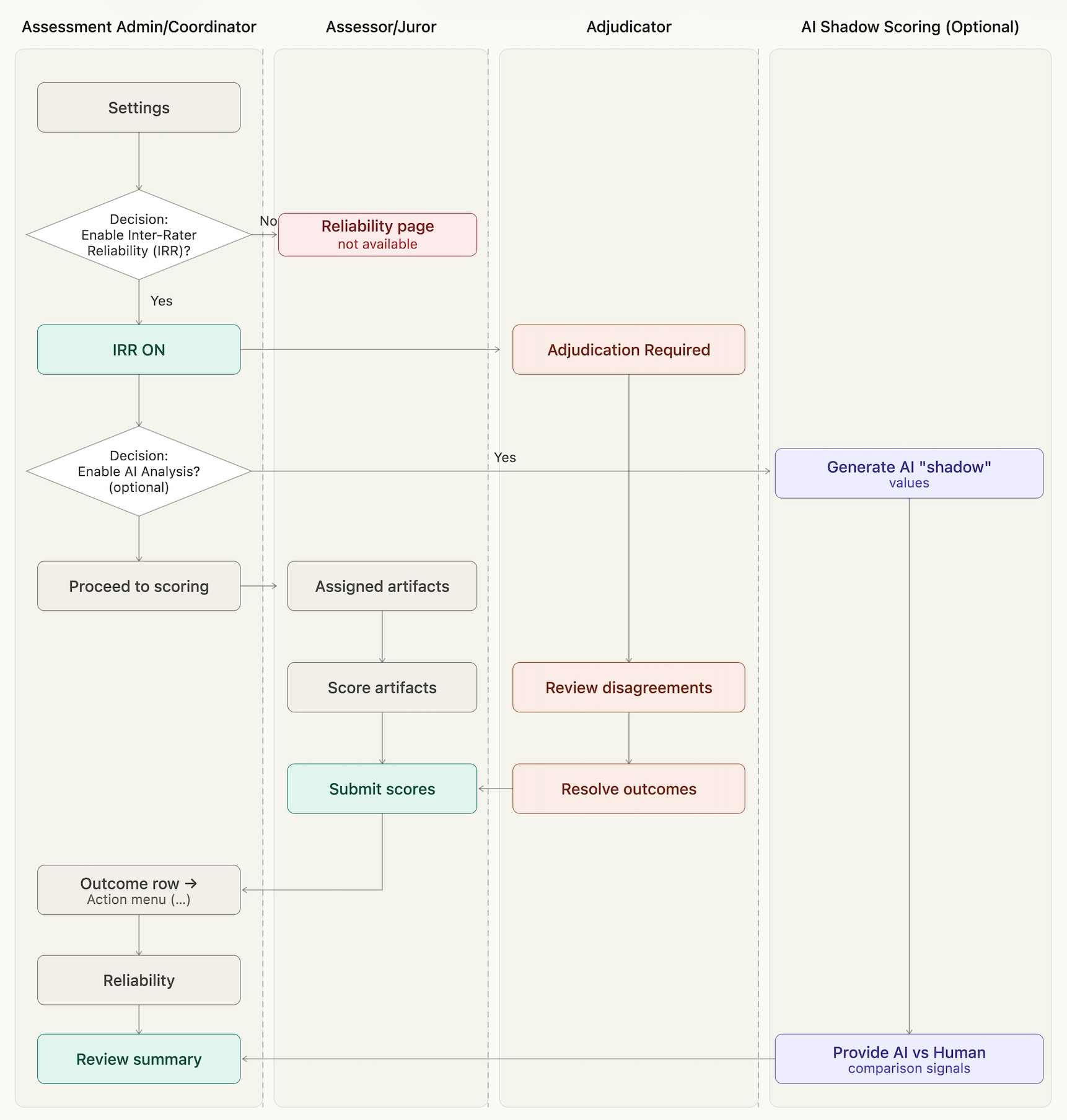
Reliability is a monitoring-and-oversight view, so access follows whoever administers a Juried Assessment, rather than the assessors who score artifacts. Availability is gated by configuration: the assessment must be a Juried Assessment with Inter-Rater Reliability (IRR) enabled.
|
Capability |
Who/Where |
|---|---|
|
Access the Reliability page |
Users who manage the Juried Assessment (e.g., assessment administrators/coordinators) Where: Assessors and Artifacts → Outcome Action Menu → Reliability |
|
Enable IRR and related settings (Manual Adjudication, AI Analysis) |
Users who manage the Juried Assessment (e.g., assessment administrators/coordinators) Where: Juried Assessment → Settings |
|
Score artifacts |
Users who manage the Juried Assessment (e.g., assessment administrators/coordinators) and assigned assessors. Where: Assessors and Artifacts → scoring |
|
View reliability data in report form |
Users who manage the Juried Assessment (e.g., assessment administrators/coordinators) Where: Juried Assessment → Assessor Reliability Juried Assessment → Reporting |
User Role Touch Points
|
Touch Point |
Administrator |
Assessor/Adjudicator |
|---|---|---|
|
Enable:
|
Configure in assessment Settings. Learn more. |
— |
|
Score artifacts |
— (not part of the scoring process) |
Score on the Assessors and Artifacts page. Learn more. |
|
Open Reliability for an outcome |
Yes, on the Assessors and Artifacts page. Learn more. |
— (not part of the scoring role) |
|
Review agreement, criteria, and trends. |
Yes, on the Reliability page. |
— |
|
Review student proficiency when Manual Adjudication is enabled. |
Yes, on the Reliability page. |
— |
Reliability Monitoring Process
-
Enable Inter-Rater Reliability for the assessment: In the assessment's settings, turn on Inter-Rater Reliability so reliability tracking is calculated, and the Reliability page becomes available. Learn more.
-
Optionally enable AI Analysis to add AI shadow comparisons. Enable this when a neutral calibration reference alongside human scoring is needed. Enabling it adds AI "shadow" values throughout Reliability. Enabling this affects the reliability of reviews; it does not change how assessors score, and the AI never grades students.
-
-
Assessors' Score Artifacts: Jurors score their assigned artifacts against the juried rubric. Reliability is computed from these scores as they are submitted. Learn more.
-
View Reliability: The Reliability view is accessed from the Assessors and Artifacts page of the Juried Assessment by selecting Reliability from the outcomes expanded Action menu.
-
Review the Summary Statistics: The Reliability page opens on the Calibration & Operations tab, which leads with a row of summary cards. Learn more.
-
Review Student Proficiency Results: The Student Proficiency tab reports settled student results, e.g., mean score, achievement-level distribution, and per-criterion concordance. Learn more.
-