
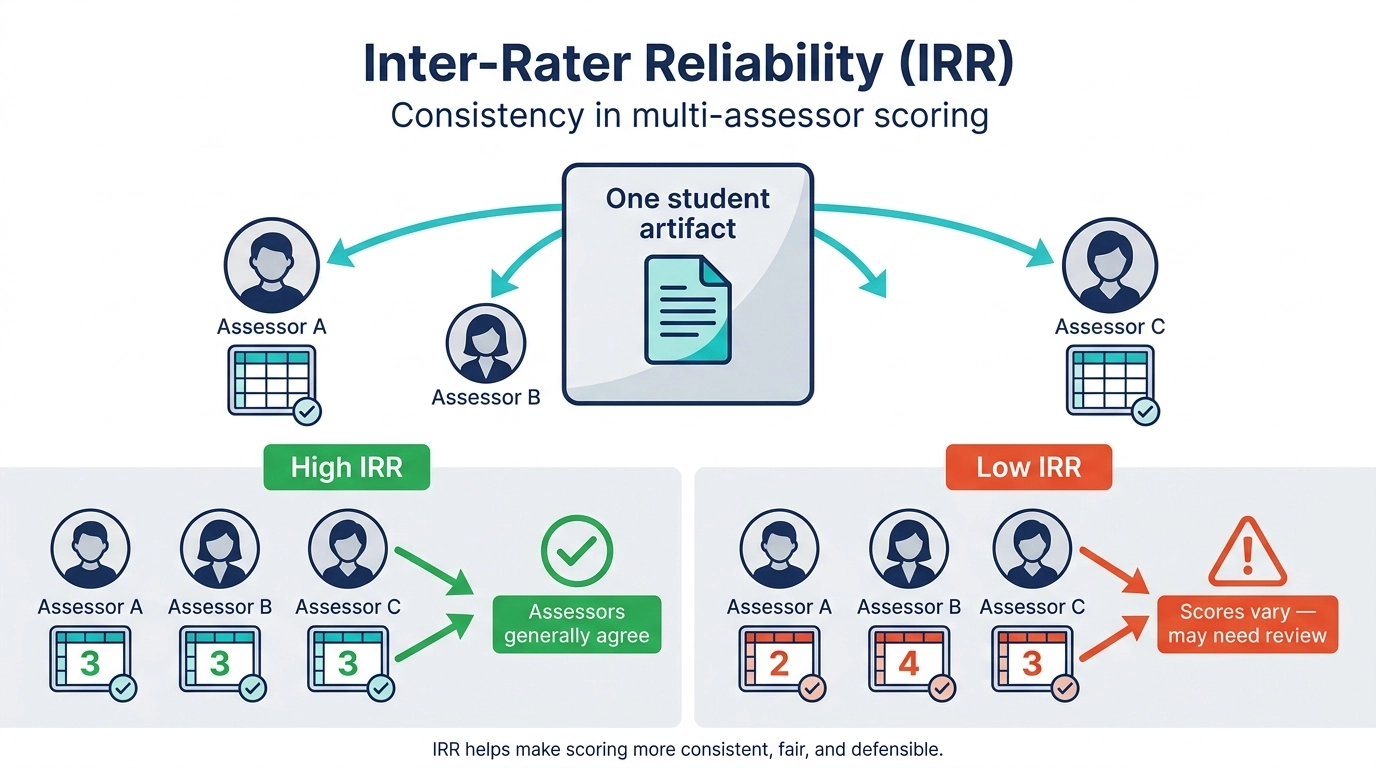
Inter‑Rater Reliability (IRR) in Juried Assessment helps institutions make multi‑assessor scoring more consistent, fair, and defensible. IRR refers to how consistently different assessors score the same artifact using the same rubric. When IRR is high, assessors generally agree; when it’s low, scores vary more and may require review. IRR is designed to:
-
Strengthen consistency across assessors (reducing “who scored it” variability)
-
Protect scoring validity by surfacing disagreements early
-
Improve governance and transparency in high-stakes assessment cycles (accreditation-ready processes)
When IRR is enabled, additional Juried Assessment functionality becomes available:
-
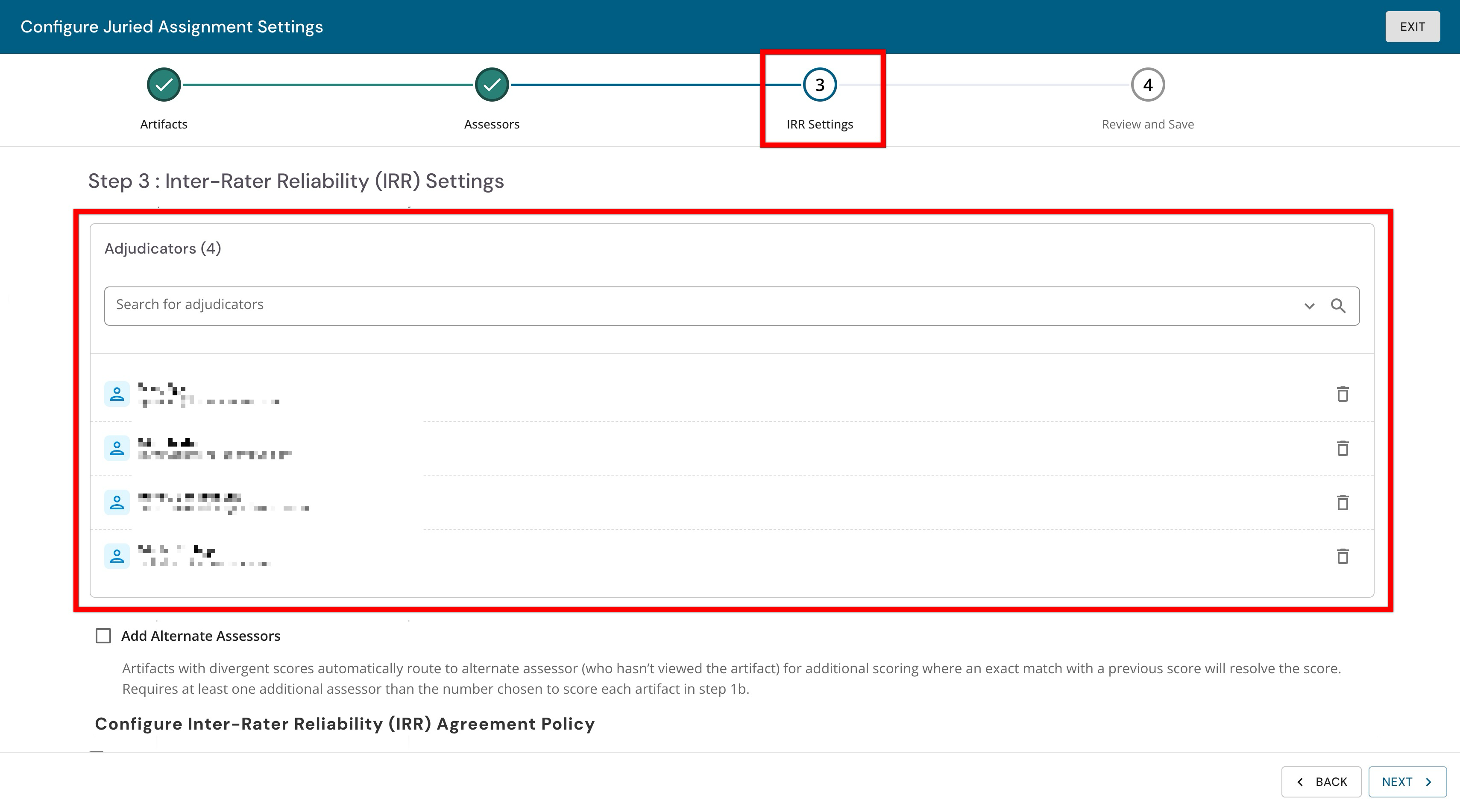
IRR Settings: IRR-specific settings are configured via the Assessors and Artifacts page. A new step becomes available to define the agreement policy and adjudication options. Learn more.
-
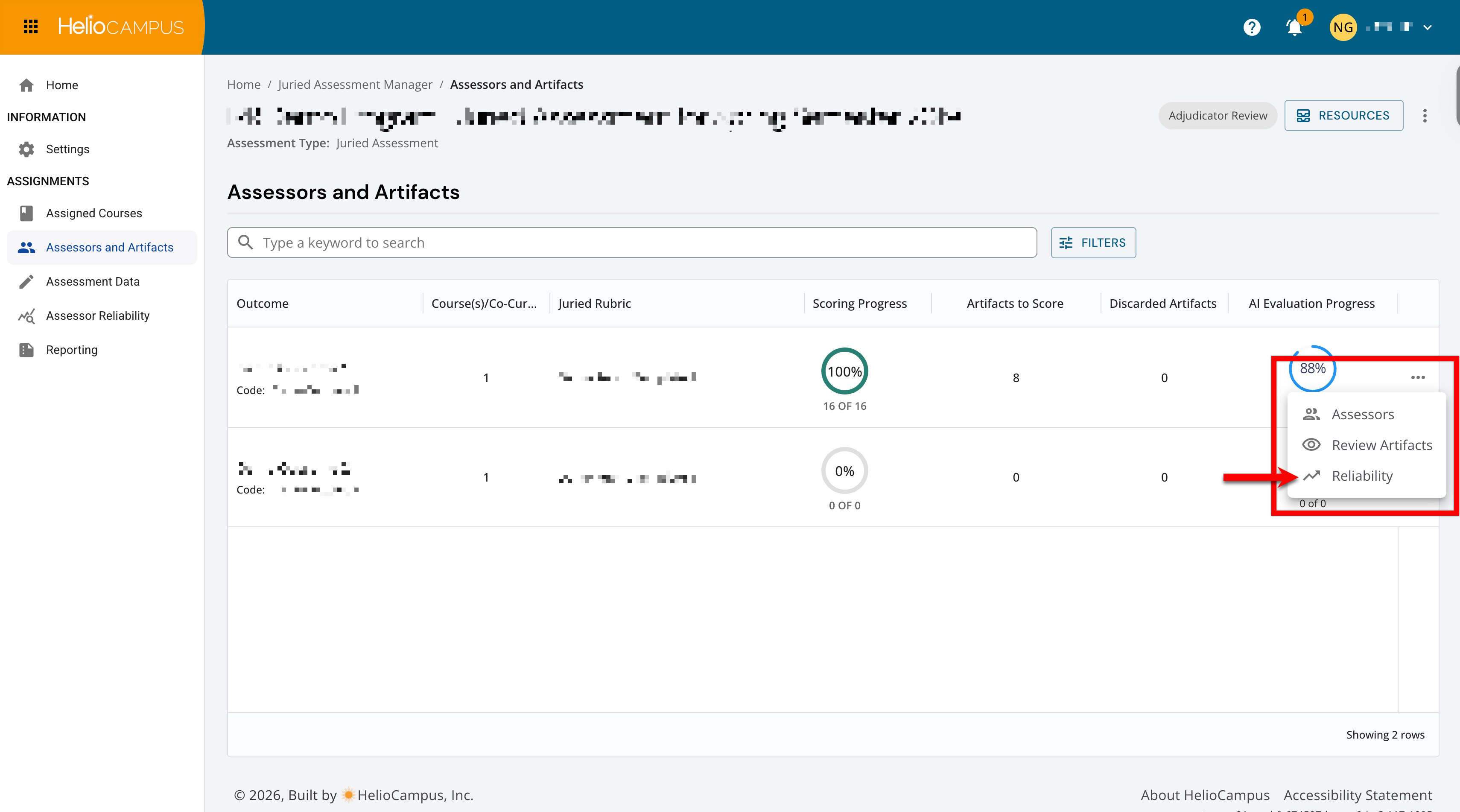
Reliability: Reliability metrics are available on the Assessors and Artifacts page. The Reliability page is an analytics view within a Juried Assessment that reads the scores that assessors submit for an outcome's artifacts. Learn more.
Assessor vs. Adjudicator
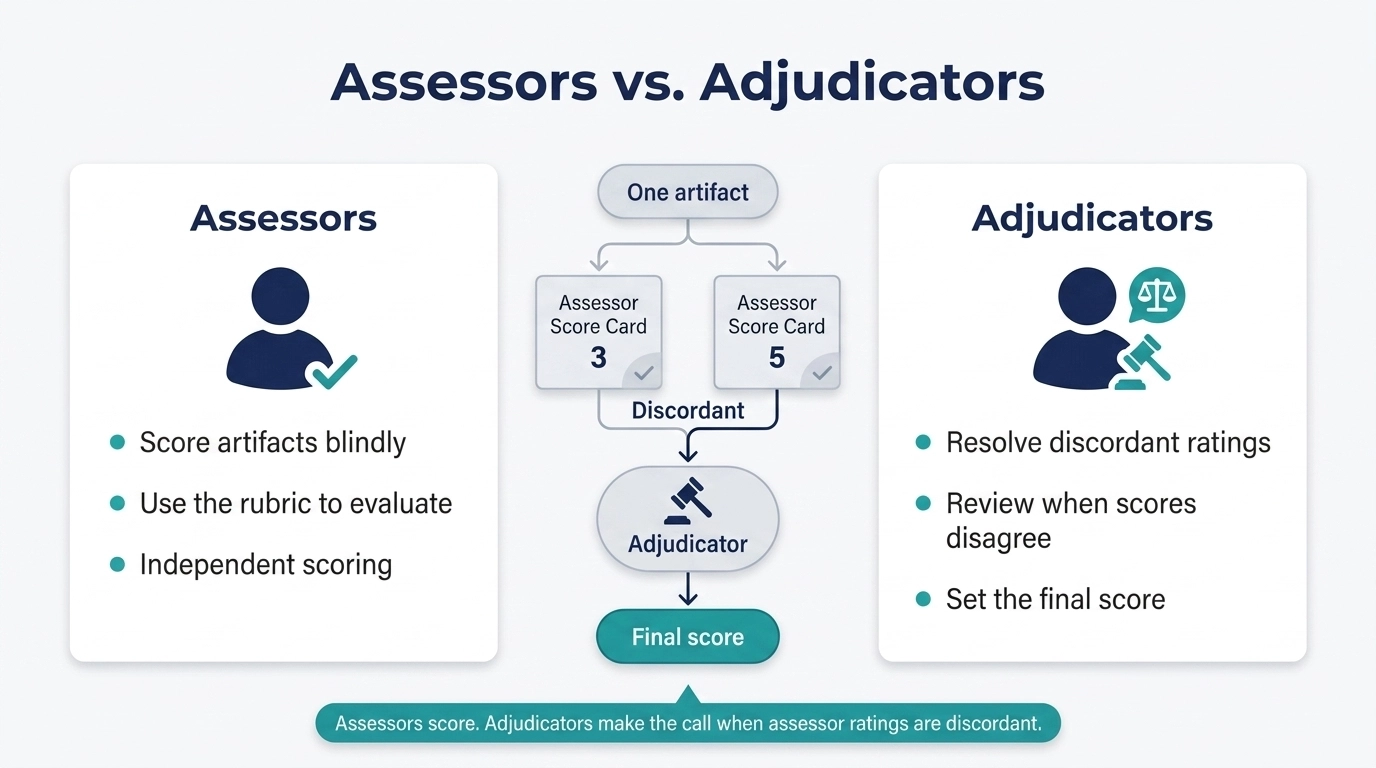
When IRR is enabled, assessors and adjudicators play different but complementary roles in Juried Assessment. Assessors independently review assigned artifacts and score them blindly using the rubric, focusing only on the evidence in the submission. When multiple assessors score the same artifact, and their ratings fall outside the configured agreement policy (i.e., the scores are discordant), the artifact enters a resolution path of adjudication. Adjudicators step in to review the artifact, consider the discrepant ratings, and make the final scoring decision. In short, assessors do the initial, independent scoring; adjudicators “make the call” when assessor ratings disagree, ensuring results remain consistent, fair, and defensible.
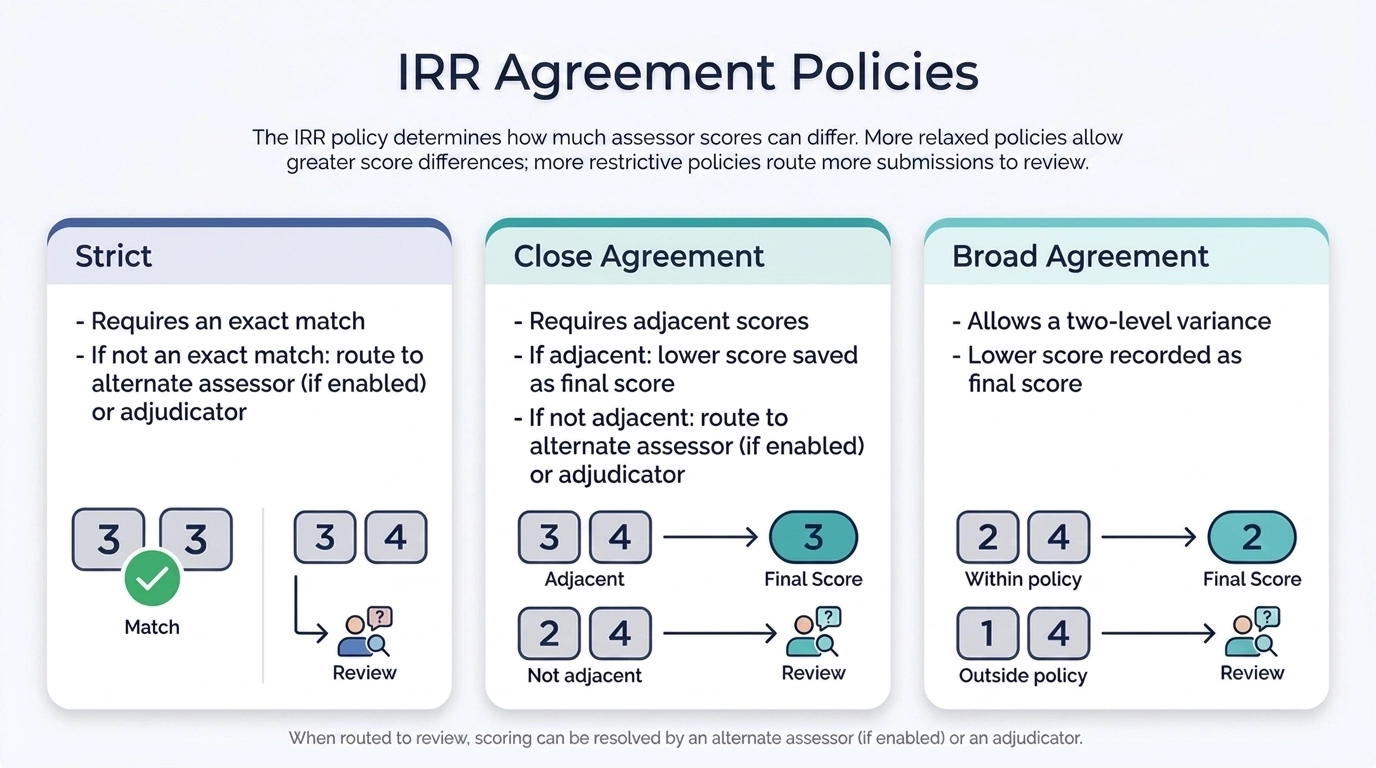
IRR Agreement Policies
By default, a Close policy is selected when configuring IRR settings, although a Strict or Broad agreement policy can also be selected.
-
Strict: This requires that assessors evaluate the artifact at exactly the same level. If the scores are not an exact match, the artifact is routed to either an alternate assessor (if enabled) or an adjudicator for final evaluation.
-
Close Agreement: This is the most common and requires assessors to submit scores that are adjacent to each other. If they are adjacent, the lower score is saved as the final score because it is the first agreeable score among the assessors. If scores are not adjacent, then the artifact is routed to either an alternate assessor if enabled, or an adjudicator for final evaluation.
-
Broad Agreement: Allows a two-level performance variance, without triggering another evaluation round. The lower of the two scores is recorded as the final score here as well.
Adjudication With IRR
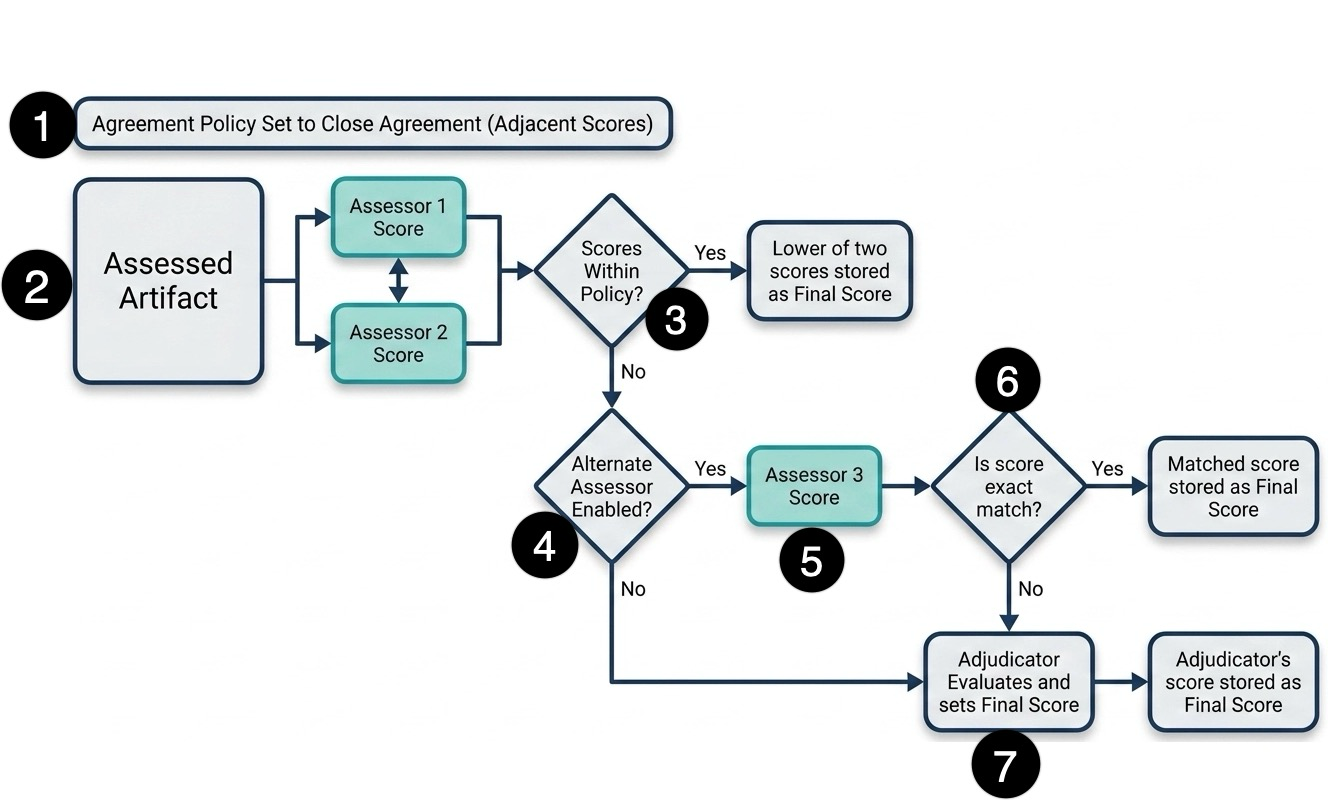
The following illustrates the conditions and handling of artifacts as they’re scored and moved through the adjudication process when IRR is enabled.
-
Configure Agreement Policy: When scheduling a Juried Assessment, administrators can set an IRR Agreement Policy that defines the range within which assessors’ scores may vary (per rubric criterion).
-
Assessor Scoring: An artifact is submitted to the workflow and evaluated independently by two assessors, generating an Assessor 1 Score and an Assessor 2 Score.
-
Detect Discordant Scoring For Resolution: Both initial scores are evaluated. If assessors’ scores fall outside the selected agreement policy threshold, the submission is treated as discordant and is routed into a structured resolution workflow.
-
Yes: If the two scores are adjacent or close enough to satisfy the policy, the workflow resolves immediately. The lower of the two scores is stored as the final score, and the process ends here.
-
No: If the scores differ significantly (which violates the policy), the workflow proceeds to the next quality-control check.
-
-
Alternate Assessor Configuration: The platform validates the configuration to determine whether an alternate assessor is enabled to serve as a tiebreaker.
-
No: If a third assessor is not part of the assessment setup, the workflow completely bypasses further automation and routes straight to the final escalation tier, where the adjudicator evaluates and sets the final score.
-
Yes: If an alternate assessor option is active, the platform routes the artifact to a third party.
-
-
Alternate Assessor: If an alternate assessor is enabled, an Assessor 3 Score is generated.
-
Score Comparison: The new Assessor 3 score is reviewed against the previous two assessor scores for an exact match.
-
Yes: If Assessor 3's score matches one of the previous scores exactly, the deadlock is broken. The matched score is stored as the final score, and the process ends.
-
No: If Assessor 3's score does not provide an exact match (leaving the total scoring pool still unresolved), the platform identifies the artifact as discordant for final escalation and adjudicator review.
-
-
Adjudicator Resolves Discrepant Scoring: This adjudication workflow routes discordant submissions to one or more adjudicators, who review the artifact and make the final scoring decision. In this step, the adjudicator evaluates the scoring discrepancy, and the adjudicator's score is used as the final score.
User Role Access & Permissions
|
Who Can Enable Inter-Rater Reliability |
|
|
Configure assessment settings to toggle Enable Inter-Rater Reliability. Learn more. |
|
Who Can Be Added As An Adjudicator |
|
|
All platform roles. |
During Juried Assessment scheduling, one or more users can be added as adjudicators. Learn more. |
|
Who Can Be Added As Alternate Assessors |
|
|
All platform roles. |
When assessors have discrepant scores on how to rate an artifact, the artifact is automatically routed to an assessor who hasn’t evaluated the artifact for another rating. Learn more. |
Downstream & Cross-Platform Impacts
-
LMS/LTI Submission Expectations: IRR is most meaningful when multiple assessors score the same artifacts against a consistent rubric; ensure that upstream LMS-linked assignments continue to deliver a sufficient, comparable set of artifacts across sections/terms.
-
Evaluation Readiness: Because discordant scoring can trigger adjudication, the assessment’s completion timeline can depend on adjudicator capacity (not just assessor completion).
-
Outcome-Level Transparency Increases: Stakeholders may see clearer signals of where scoring agreement is strong vs. where rubric interpretation varies (useful for auditability and improvement planning).
-
Reporting: Downstream consumers should be prepared to distinguish between individual assessor scores, any “final” score after adjudicator review, and summary statistics used for reliability monitoring. Although the “final” score is displayed, CSV export of all scores is available on the Reporting page for a Juried Assessment.
-
Access and Role Implications: Enabling IRR introduces adjudication responsibilities; users assigned as adjudicators (and admins monitoring reliability/operations) may gain visibility into additional workflow states (e.g., discordant items) that weren’t part of a single-assessor scoring process.
Considerations
-
Assessor count and coverage: IRR requires multiple assessors per artifact; confirm staffing levels before enabling to avoid bottlenecks. Learn more:
-
Adjudicator Capacity and Turnaround: Decide who will adjudicate, how quickly they can respond, and what happens if adjudication piles up.
-
Agreement Policy: Choose an agreement threshold that aligns with the rubric's granularity. Too strict can over-route to adjudication; too loose can hide meaningful disagreement.
-
Rubric Clarity and Assessor Calibration: If the criteria language is ambiguous, IRR may surface high discordance; plan calibration activities to ensure IRR becomes a quality tool rather than a constant exception queue.
-
Communication Plan for Stakeholders: Ensure consumers of assessment results understand what IRR does (and does not) mean, and how “final scores” are produced when disagreement occurs.
Best Practices
-
Enable IRR for a limited set of outcomes/terms first to validate agreement policies, adjudication workload, and staffing assumptions.
-
Treat adjudication as a scheduled responsibility. Assign adjudicators up front, define expected response times, and monitor the queue during scoring windows.
-
Use discordance as a rubric-improvement signal. When the same criteria repeatedly produce low agreement, prioritize rubric wording updates and assessor calibration—not just more adjudication.
-
Review “agreement vs. throughput” regularly and adjust agreement thresholds if adjudication volume is too high/low relative to the goals (validity vs. speed).
-
Document the scoring governance to capture who adjudicates, when adjudication is required, and how final decisions are made to support defensibility and continuity across cycles.