Review the Notification Offset Configuration article to understand how offsets, milestone events, and notification timing work together. Confirm these concepts before making changes so survey schedules and communications are configured as intended.
Survey Schedule and Notification Settings determine when Course Evaluation Surveys open and close, which notifications are sent, and when survey-related communications are delivered. These settings help Institutions standardize survey timing and communication defaults across Student Course Evaluations, Instructor Course Evaluations, and General Course Evaluations. These configurations affect downstream survey work, including participant communication, response windows, reminder timing, result availability, and reporting readiness. For this reason, these settings are often used to balance three operational needs:
-
Consistent Survey Administration: Establishing predictable survey start and end times across the Institution.
-
Clear Communication: Ensuring Survey Administrators, Instructors, and participants receive the right notifications at the right time.
-
Governance and Flexibility: Applying institution-level defaults while determining whether lower hierarchy levels may adjust their own settings.
Settings can be locked at a higher level to prevent configuration at lower levels and apply defaults and governance at the appropriate hierarchy level. For example, if Survey Schedule and Notification Settings are configured and locked at the Institution level, Colleges, Departments, Administrative Divisions, and Administrative Units inherit that configuration and cannot change it. If lower-level flexibility is permitted, units may configure settings to support their own survey administration practices. Learn more.
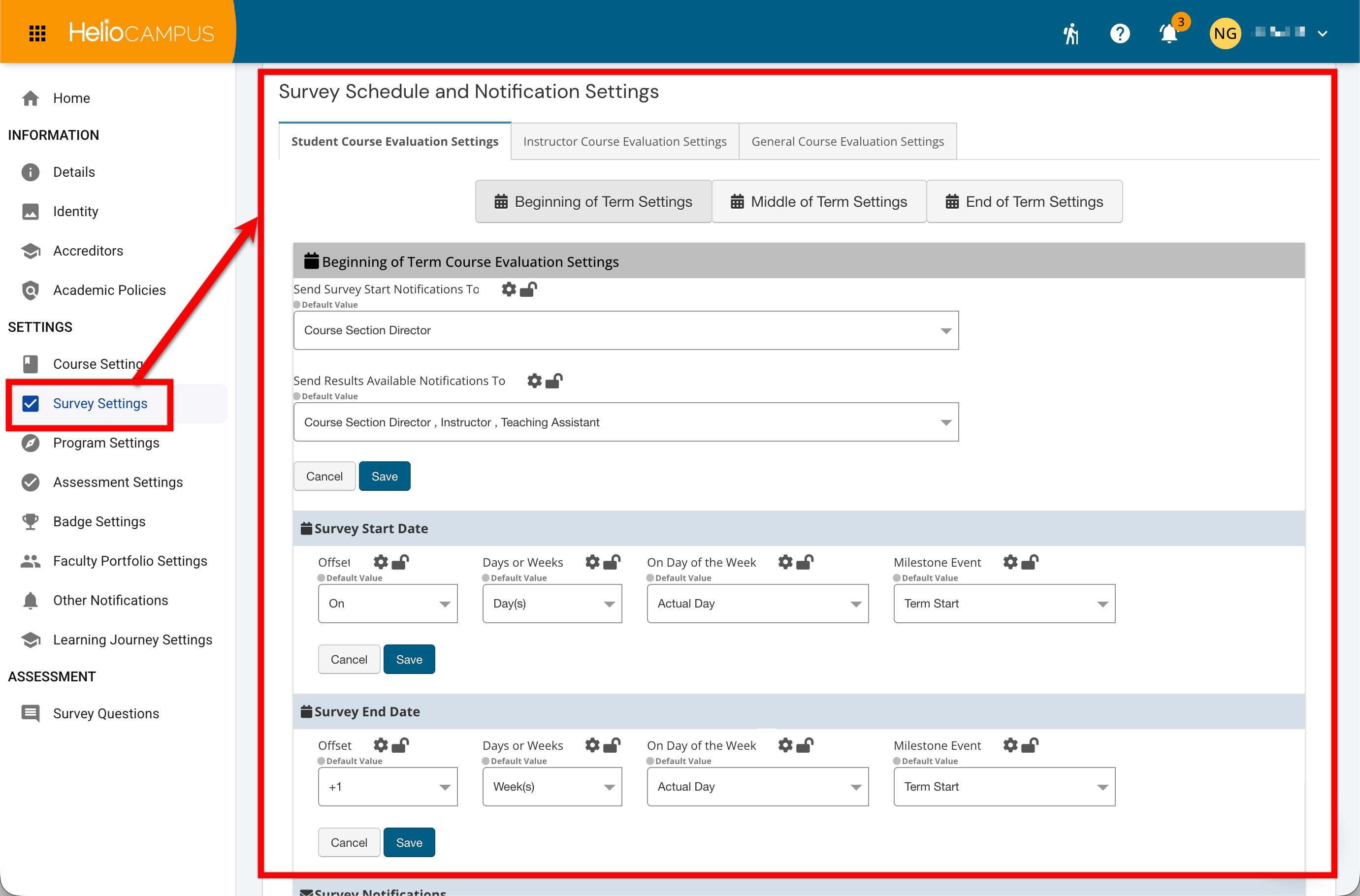
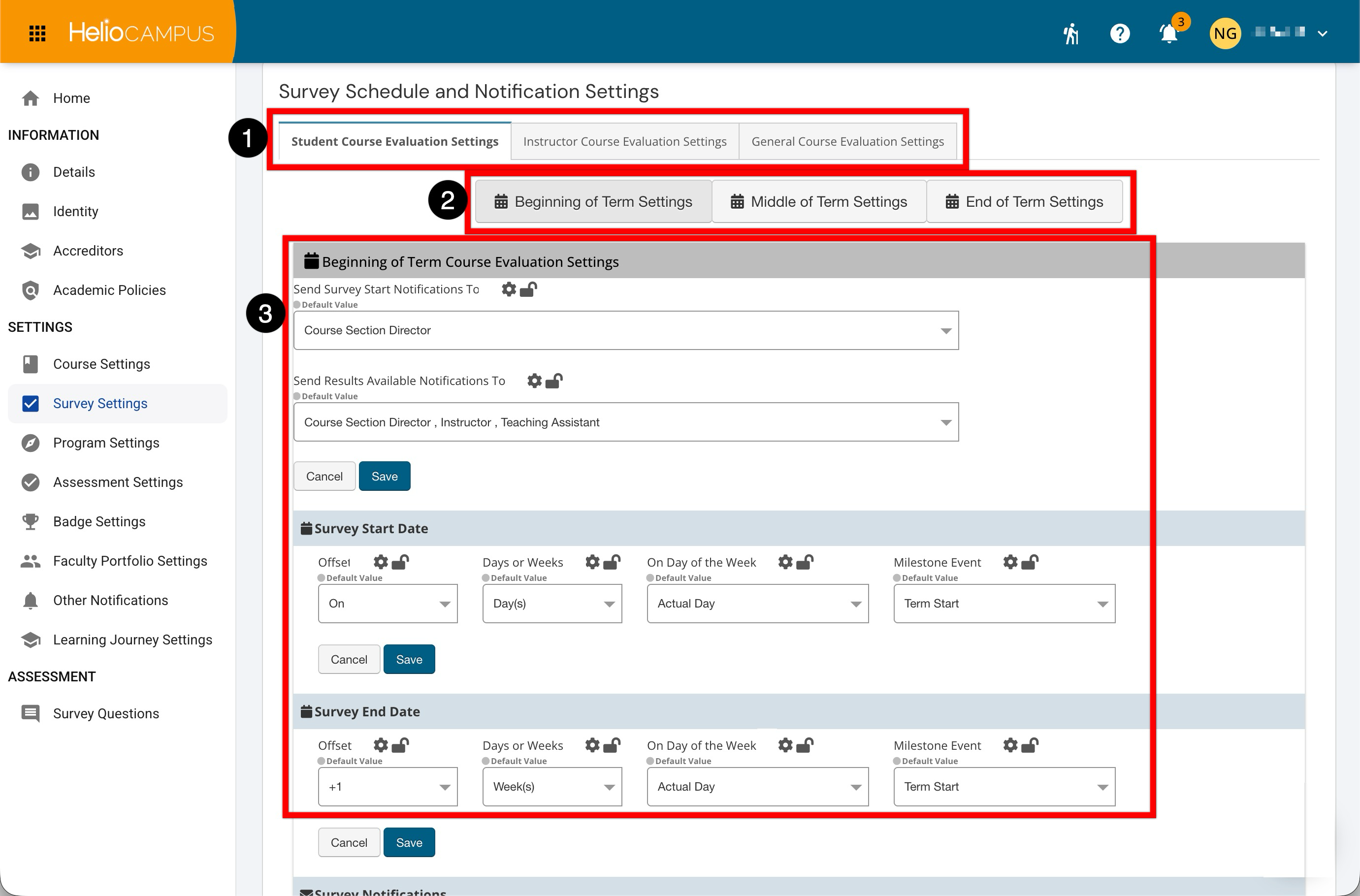
These settings organize configuration by evaluation audience and point in the academic term, helping Institutions apply consistent survey schedules across course sections. Institutions can identify who receives survey-start and results-available notifications and set start and end dates using an offset (days or weeks), an optional day-of-week rule, and an institutional milestone event such as term start. Together, these values calculate survey timing relative to the academic calendar. The Course Evaluation tabs separate configuration by audience (1).
-
Student Course Evaluation Settings apply to surveys completed by students
-
Instructor Course Evaluation Settings apply to surveys completed by instructors
-
General Course Evaluation Settings support evaluations intended for other audiences or purposes.
The term tabs organize survey schedules into Beginning of Term, Middle of Term, and End of Term periods (2). Each period can have its own dates and notification rules, allowing survey activity to align with different stages of the academic calendar. The settings section for each evaluation type and term period defines the notification recipients and survey availability window (3).
Downstream Impacts
-
Survey Availability: Start and end date offsets determine when surveys become available to participants and when the response window closes.
-
Participant Communications: Invitation and reminder timing affects when participants are prompted to complete evaluations and how often they receive follow-up communication.
-
Administrator and Instructor Awareness: Start and results-available notifications help stakeholders know when surveys are launching and when results can be reviewed.
-
Reporting and Results Review: End date and results-availability timing affect when response data can be reviewed, shared, and used for follow-up activities.
Considerations
-
Notification Audience: Determine which users should receive survey start and results-available notifications in addition to the Survey Administrator.
-
Communication Volume: Review invitation and reminder timing to avoid over-communication while still supporting strong response rates.
Best Practices
-
Define institution-wide survey schedule standards before configuring offsets. Configure beginning, middle, and end-of-term settings individually for each applicable evaluation type.
-
Confirm notification template language before distributing survey communications and review notification recipients before each survey cycle to confirm the correct audiences are included
-
Use reminder timing that supports response rates without overwhelming participants.
-
Apply settings consistently across comparable survey cycles to support predictable administration and reporting.
-
Periodically review survey schedules, notification performance, response rates, and support questions to determine whether the settings remain appropriate.
Beginning of Term Course Evaluation Settings
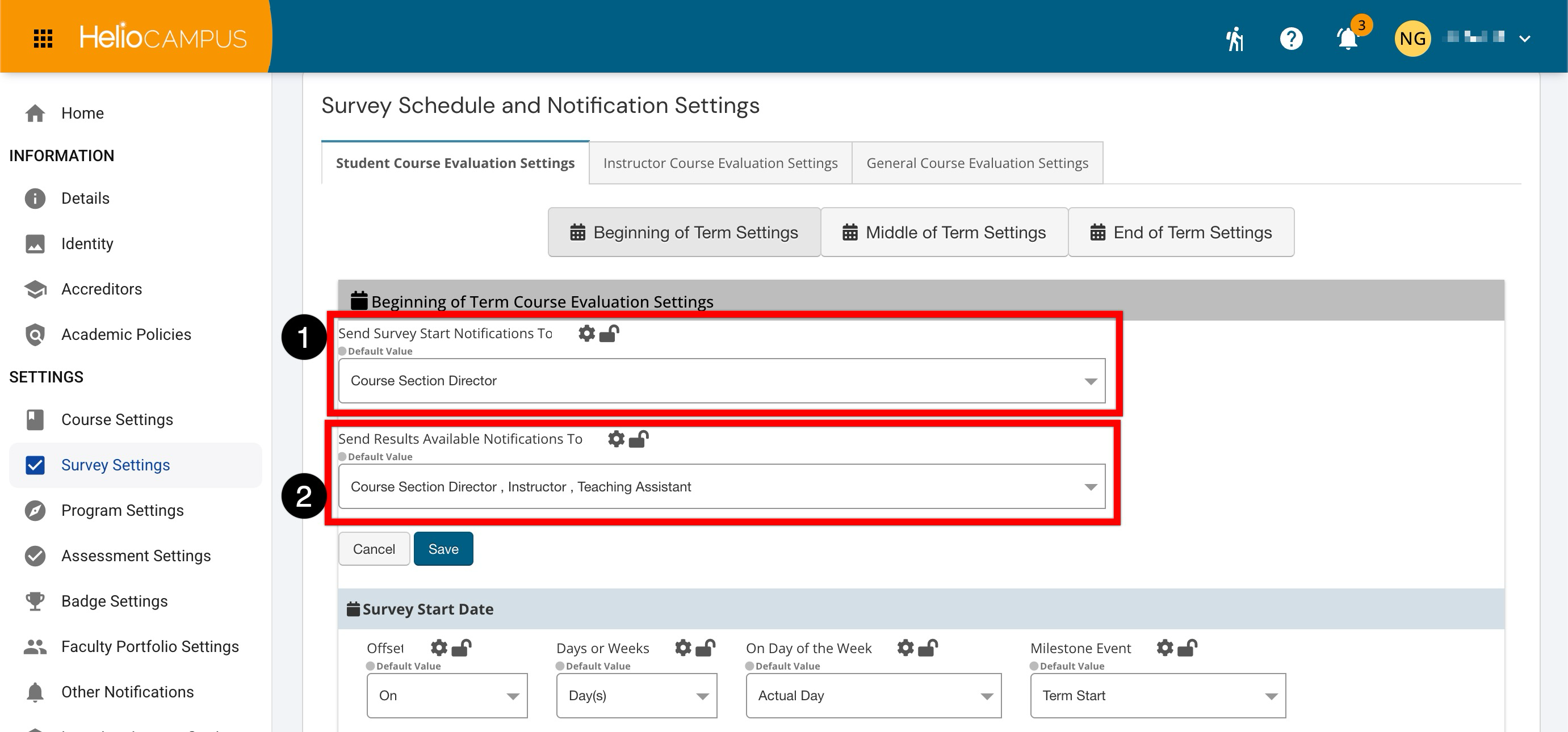
This section controls schedule and notification defaults for surveys associated with the beginning of a term. Use this section to define when Student/Instructor/General Course Evaluation surveys begin and end, and who receives key notifications. When configuring these dropdowns, distinguish between receiving a notification and having access to the related survey or results. A notification alerts the selected recipients, but it does not necessarily grant additional access.
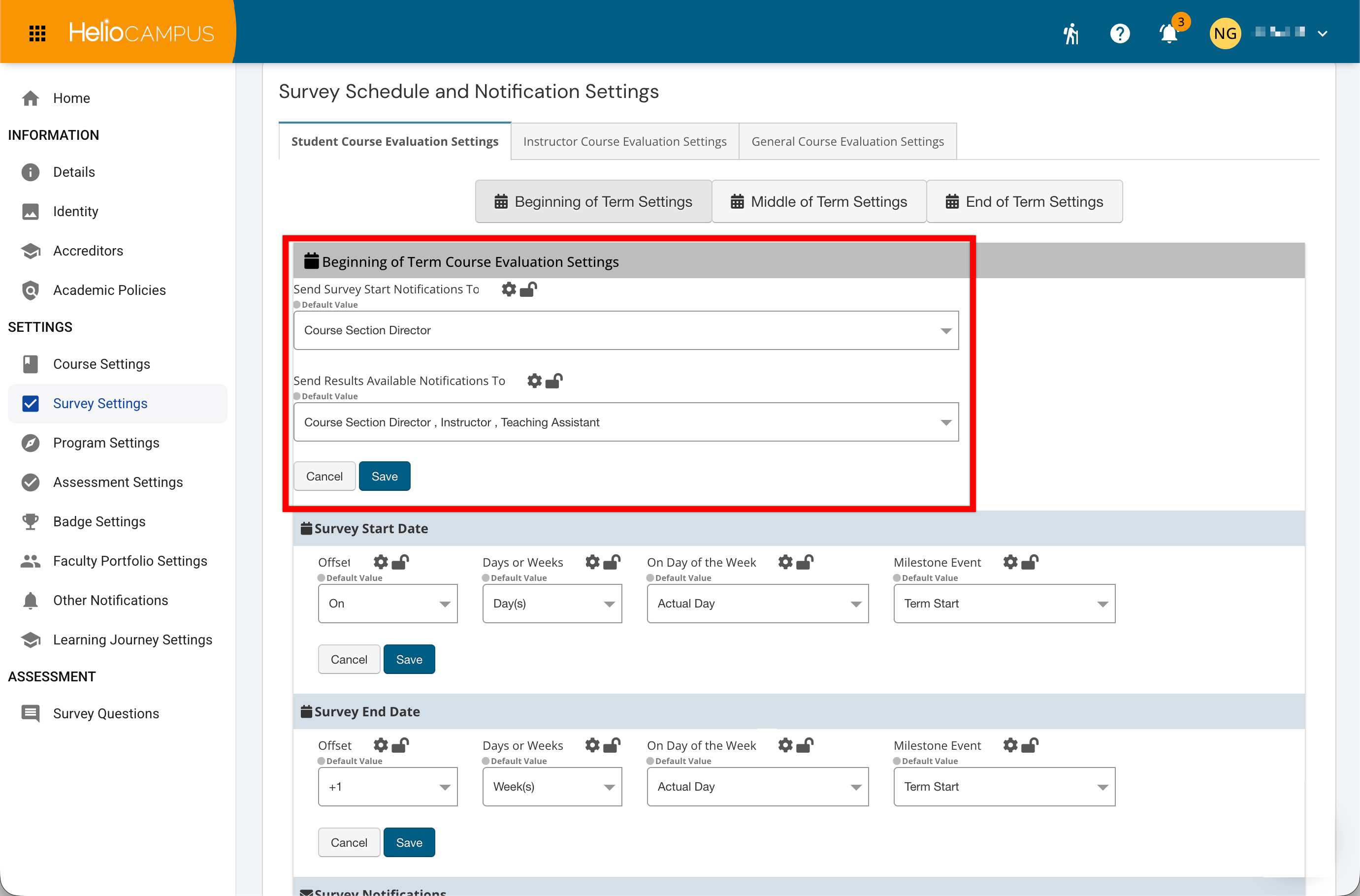
The Send Survey Start Notifications To dropdown (1) determines which course section roles receive a notification when the Course Evaluation Survey opens. Select one or more roles based on who needs to know about the active evaluation period. The Send Results Available Notifications To dropdown (2) determines which course section roles are notified when survey results become available. Select only the roles that should know when results are ready for review; available roles and their access to results depend on institutional permissions and survey result-release configuration. Learn more.
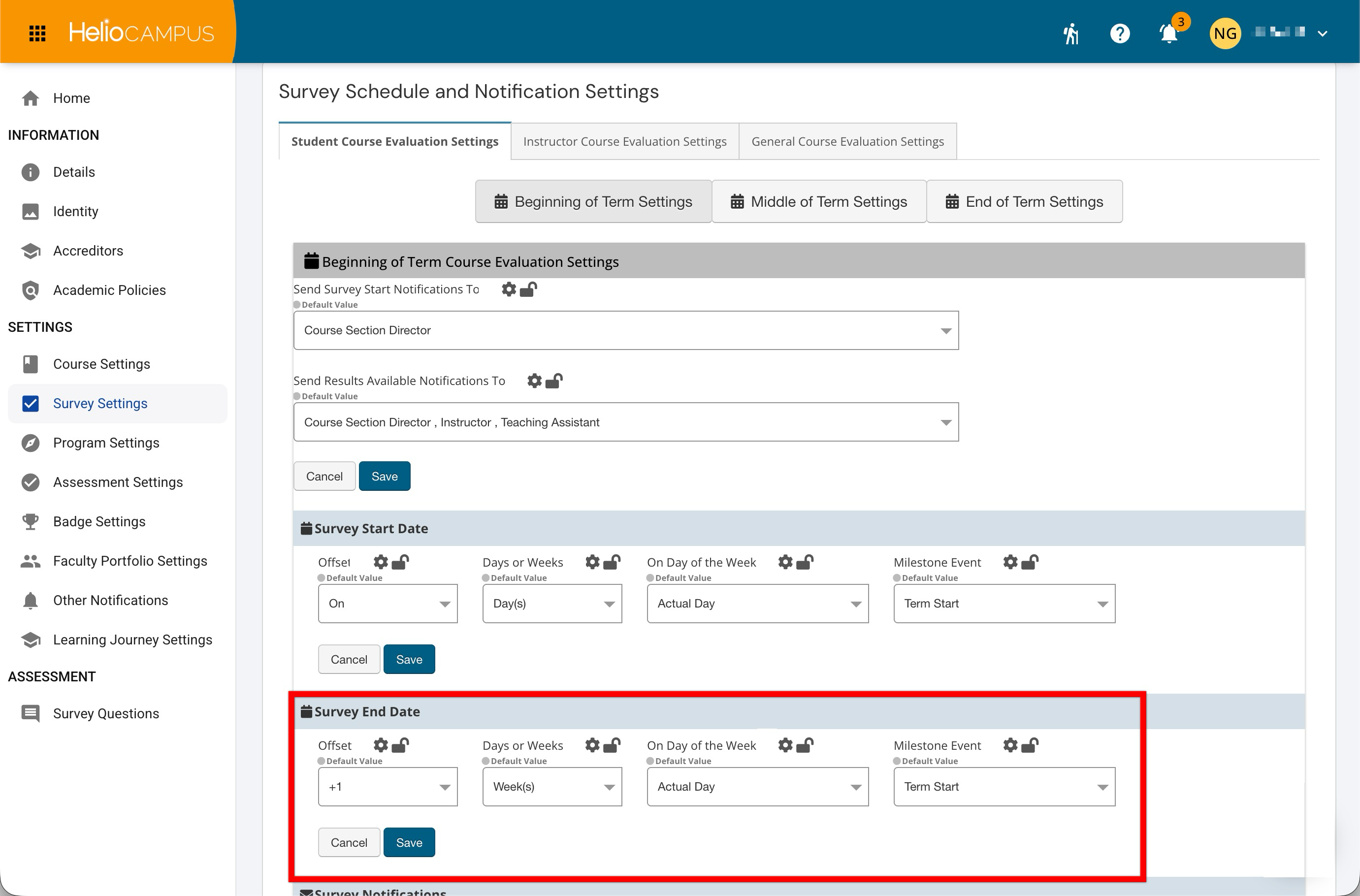
Survey Start Date
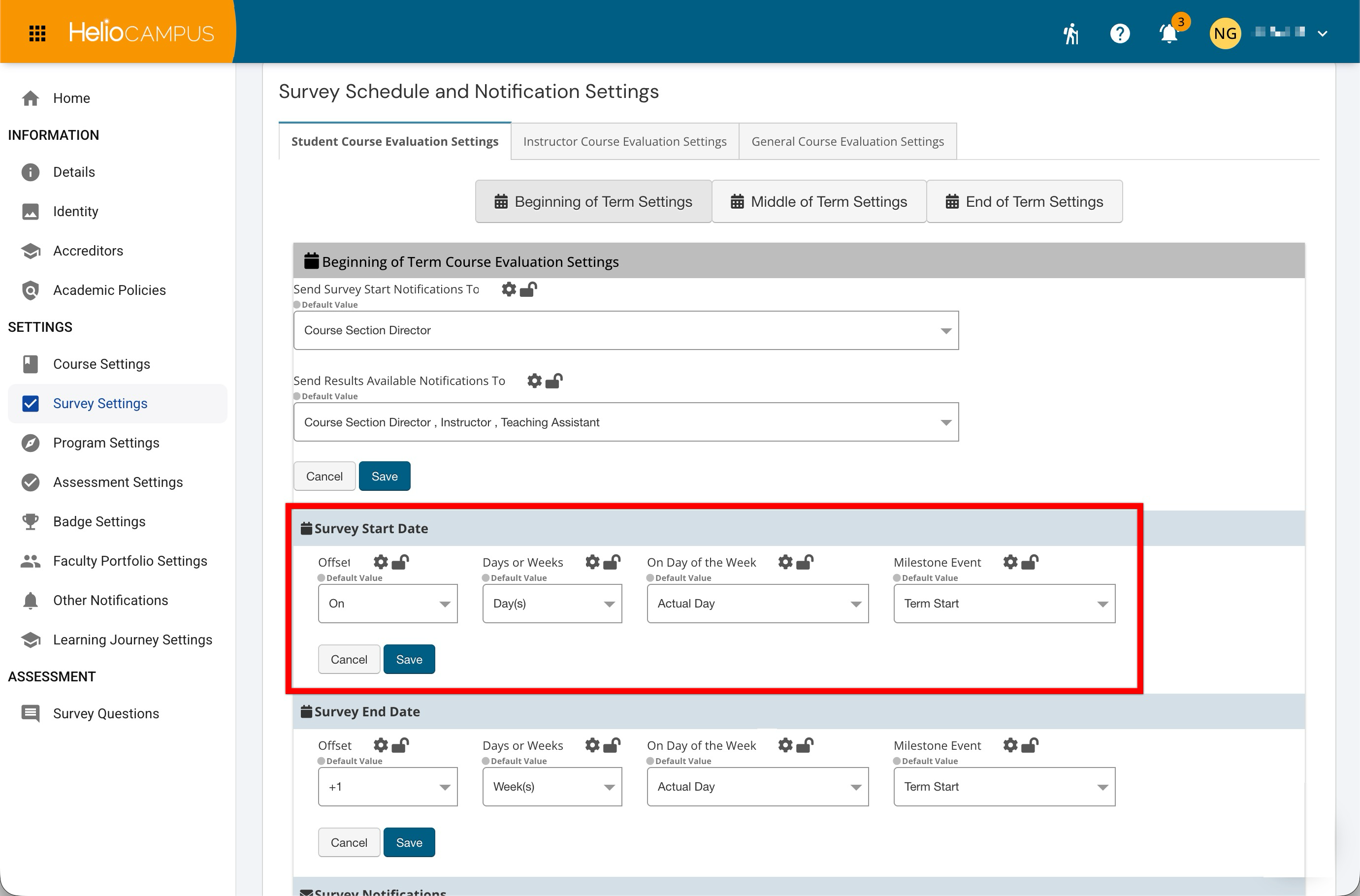
The Survey Start Date settings determine when surveys open relative to the configured term timing. Use this setting to define the start offset that should apply when Course Evaluation Surveys are scheduled. The offset defines when the survey begins in relation to the selected milestone event. Configure this value so surveys open early enough for participants to complete evaluations within the intended response window. For example, if the selected milestone is the course end date and the offset configuration is set to 14 days before, the survey opens two weeks before the course ends.
Survey End Date
The Survey End Date settings determine when surveys close relative to the configured term timing. Use this setting to define the end offset that should apply when Course Evaluation Surveys are scheduled. The offset defines when the survey begins in relation to the selected milestone event. Configure this value so surveys close with enough time for participants to complete evaluations within the intended response window. For example, if the selected milestone is the course end date and the offset is set to 3 days before, the survey closes three days before the course ends.