
Instructor review serves as a quality-control step before student-submitted evidence is made available for inclusion in the Learning Journey. Only approved self-issued evidence becomes available for students to use in their stories or Comprehensive Learning Journey. This review process helps Institutions:
-
Confirm that the submitted artifact reflects the student’s work
-
Verify that the evidence is connected to the correct learning experience
-
Ensure the evidence is appropriate to associate with the selected outcome, skill, or competency
-
Prevent incomplete, inaccurate, or unrelated evidence from being shared
-
Support a more credible and complete representation of student achievement
The self-issued evidence workflow begins when a student submits evidence from the Learning Journey. After the student submits the evidence, it enters an approval workflow. The Instructor associated with the learning experience reviews the submission and determines whether to approve or deny the evidence. Instructors should review each self-issued evidence submission to determine whether it accurately supports the student’s selected learning connection. When reviewing a submission, consider the following questions:
-
Does the evidence appear to belong to the student?
-
Is the artifact complete and viewable?
-
Does the evidence relate to the selected course, experience, outcome, skill, or competency?
-
Does the description clearly explain what the evidence represents?
-
Is the evidence appropriate for inclusion in the student’s Learning Journey?
-
Would the evidence help an external viewer understand the student’s learning or achievement?
If the evidence meets expectations, the submission can be approved. Approved evidence can then be made available for the student to include in the Learning Journey. If the evidence does not meet expectations, the submission should be denied. When denying evidence, include a clear comment so the student understands why the evidence was not approved and what may need to be changed before resubmitting. After review, students will be able to see whether their self issued evidence was approved or denied.
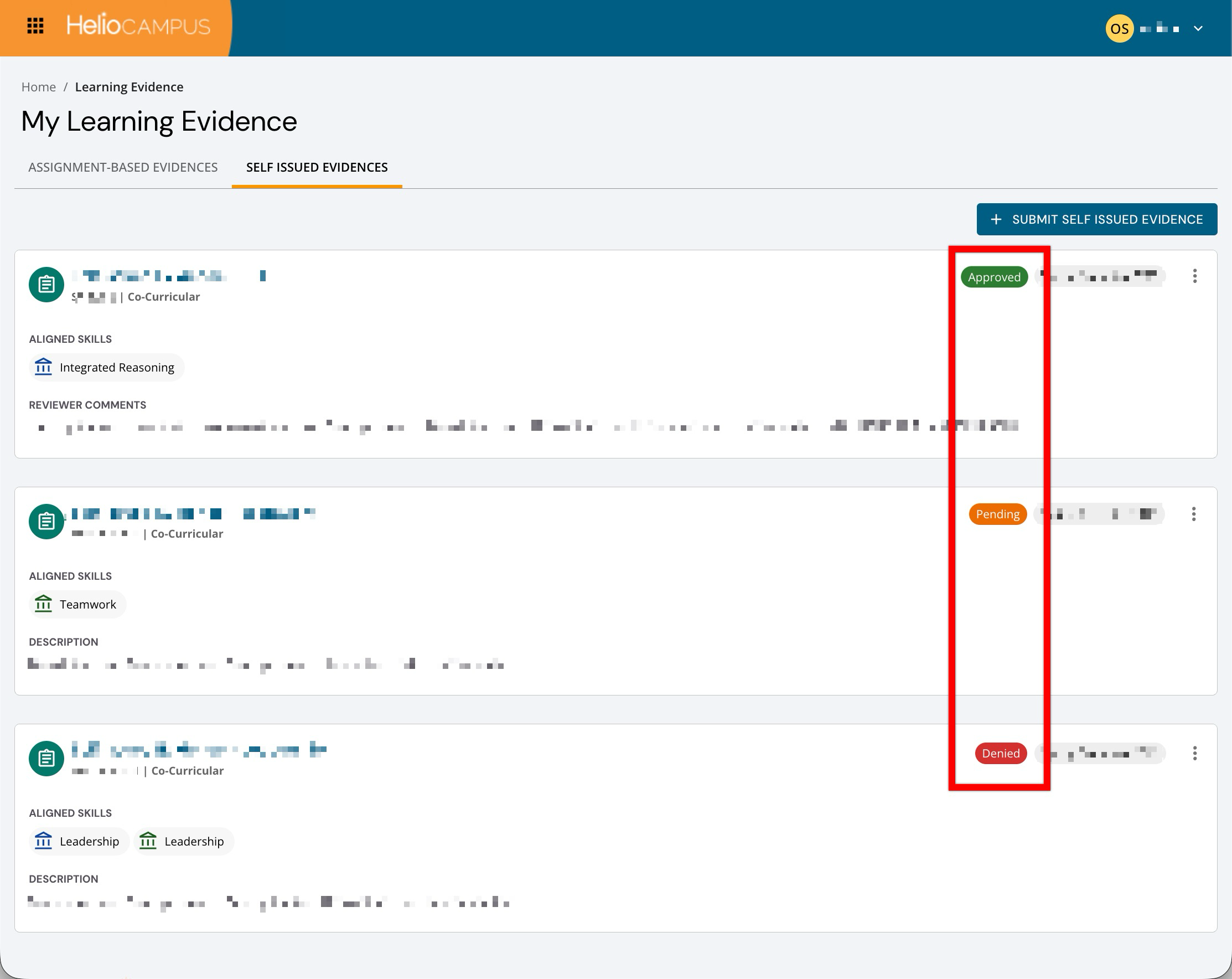
Best Practices
-
Review submissions promptly so students can continue building their Learning Journey.
-
Focus on whether the evidence supports the selected learning experience and outcome.
-
Confirm that uploaded files or linked artifacts are accessible.
-
Use denial comments to guide students toward a successful resubmission.
-
Avoid approving evidence that is incomplete, unrelated, or unverifiable.
-
Consider the audience of the Learning Journey, especially if students may share it with employers, graduate programs, or other external viewers.
Approving Self Issued Evidence
Approve evidence when the submission is accurate, appropriate, and aligned with the selected learning context. The student may use approved self-issued evidence to support their Learning Journey. This allows the student to showcase learning that may not have been collected through standard assessment workflows while still maintaining Instructor validation.
-
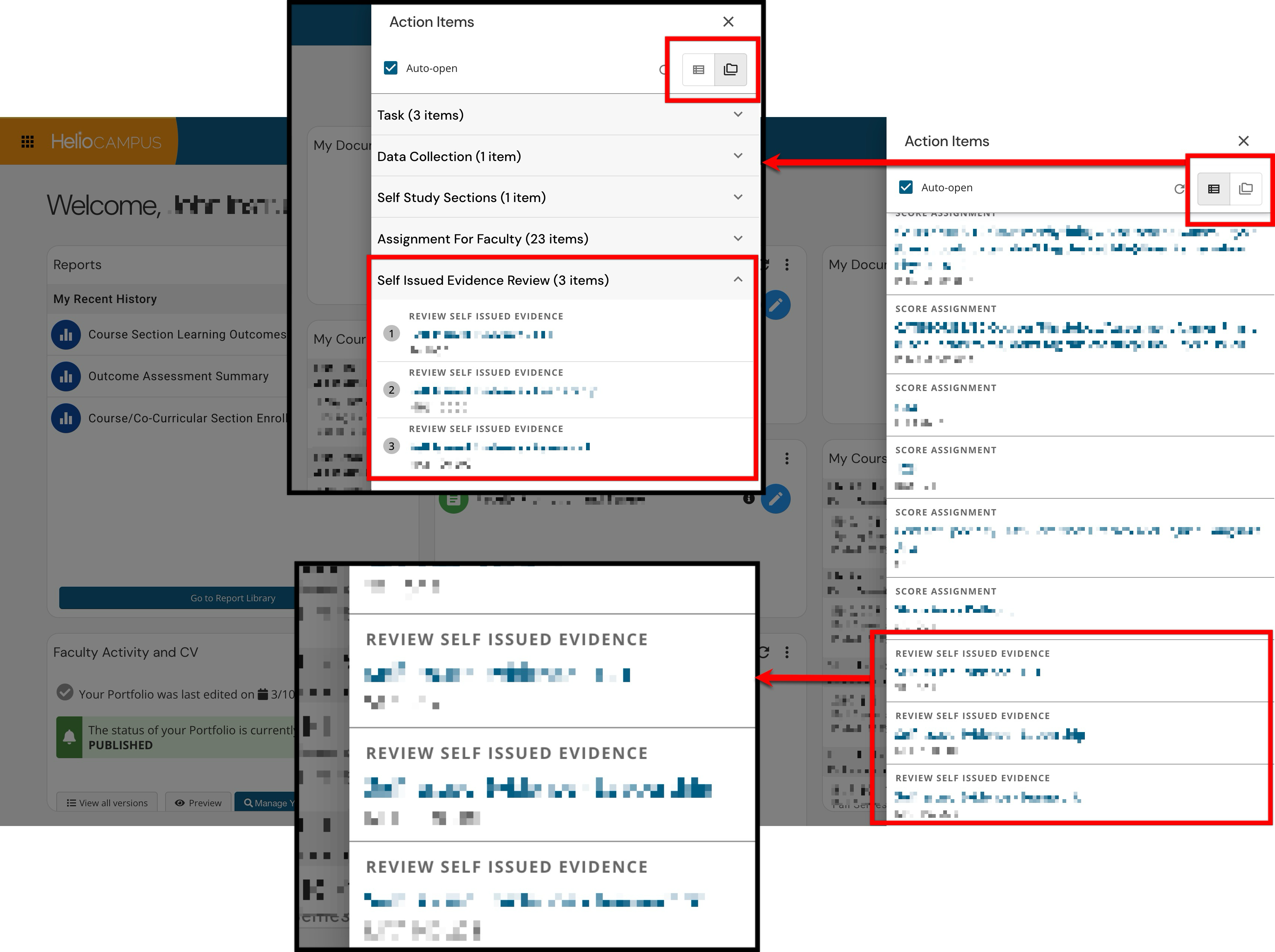
Instructors will be assigned an action item to review and approve or deny self issued evidence. From the Action Items panel, locate the Self Issued Evidence Review section and click the name to select the self issued evidence item and begin review.
-
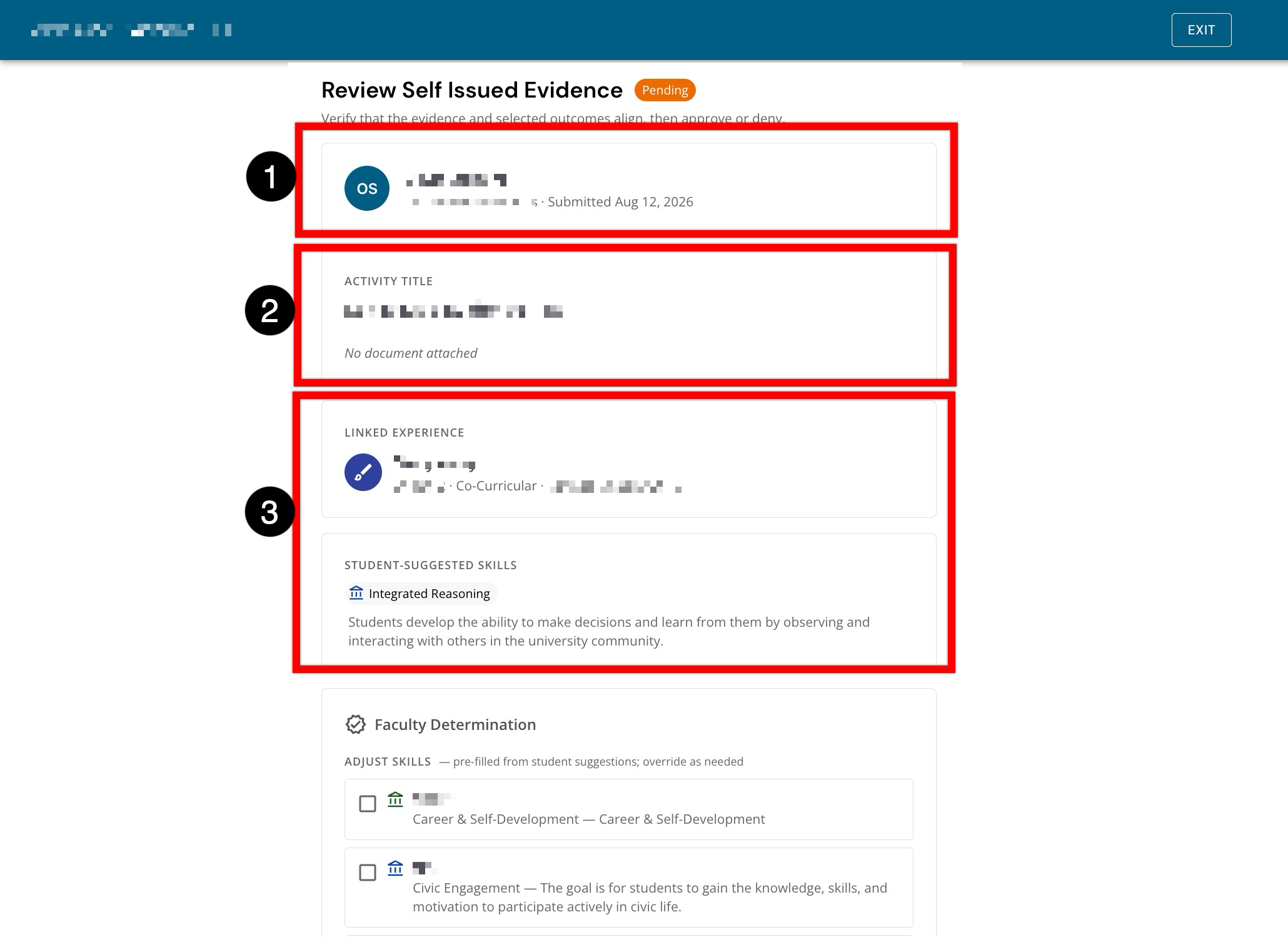
The student and submission information at the top of the page, including the submission status and submitted date (1). The Activity Title section is helpful to understand the evidence the student submitted (2). Review the Linked Experience and Student-Suggested Skills sections (3) to confirm that the evidence aligns with the selected experience and suggested skills.
-
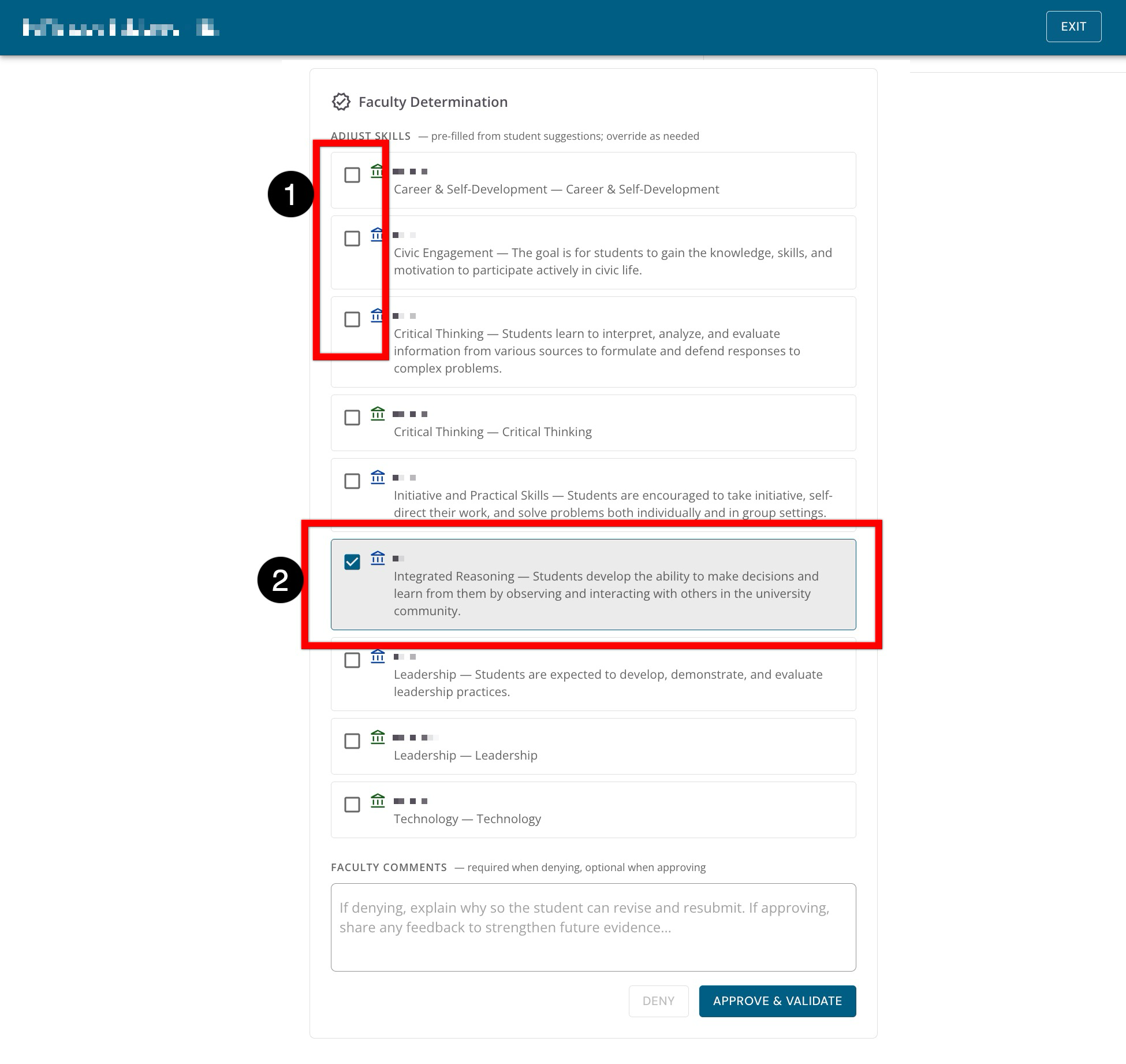
In the Faculty Determination section, review the available skills. Select or clear checkboxes (1) to confirm which skills should be validated by the evidence and ensure the selected skills accurately represent what the submitted evidence demonstrates. Student-suggested skills are pre-selected (2).
-
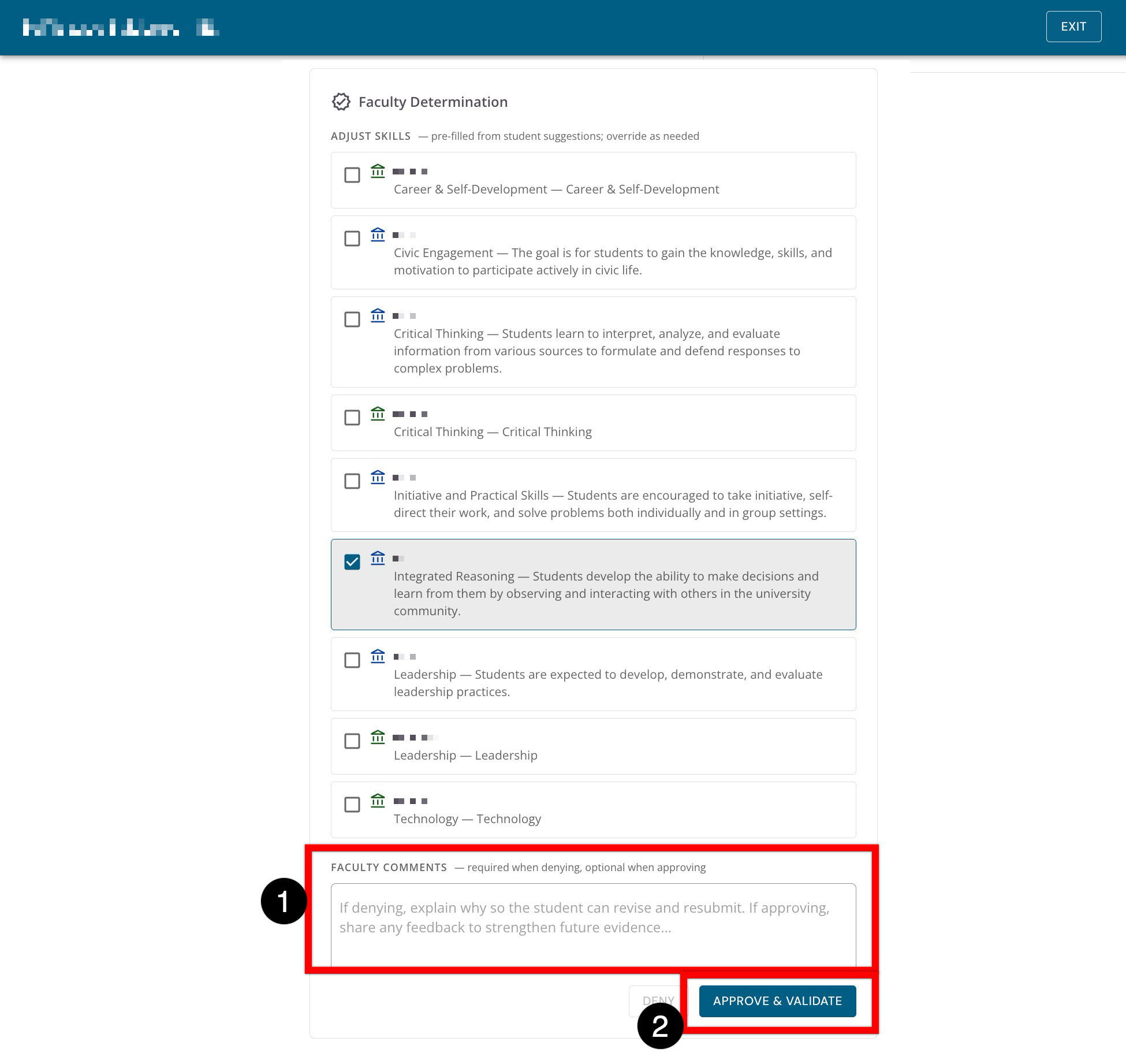
Comments are not required when approving evidence, but when entered, they can help provide feedback to the student (1). Clicking Approve & Validate (2) will approve the evidence and validate the selected skills.
-
Denying Self Issued Evidence
Deny evidence when the submission should not be included in the student’s Learning Journey in its current form. Some common reasons to deny self-issued evidence include:
-
The file or link is missing, inaccessible, or incorrect
-
The evidence does not appear to match the selected experience
-
The evidence does not support the selected outcome, skill, or competency
-
The submission is incomplete or unclear
-
The evidence is not appropriate for external sharing
-
The Instructor cannot verify the artifact
-
Instructors will be assigned an action item to review and approve or deny self issued evidence. From the Action Items panel, locate the Self Issued Evidence Review section and click the name to select the self issued evidence item and begin review.
-
The student and submission information at the top of the page, including the submission status and submitted date (1). The Activity Title section is helpful to understand the evidence the student submitted (2). Review the Linked Experience and Student-Suggested Skills sections (3) to confirm that the evidence aligns with the selected experience and suggested skills.
-
In the Faculty Determination section, review the available skills. Select or clear checkboxes (1) to confirm which skills should be validated by the evidence and ensure the selected skills accurately represent what the submitted evidence demonstrates. Student-suggested skills are pre-selected (2).
-
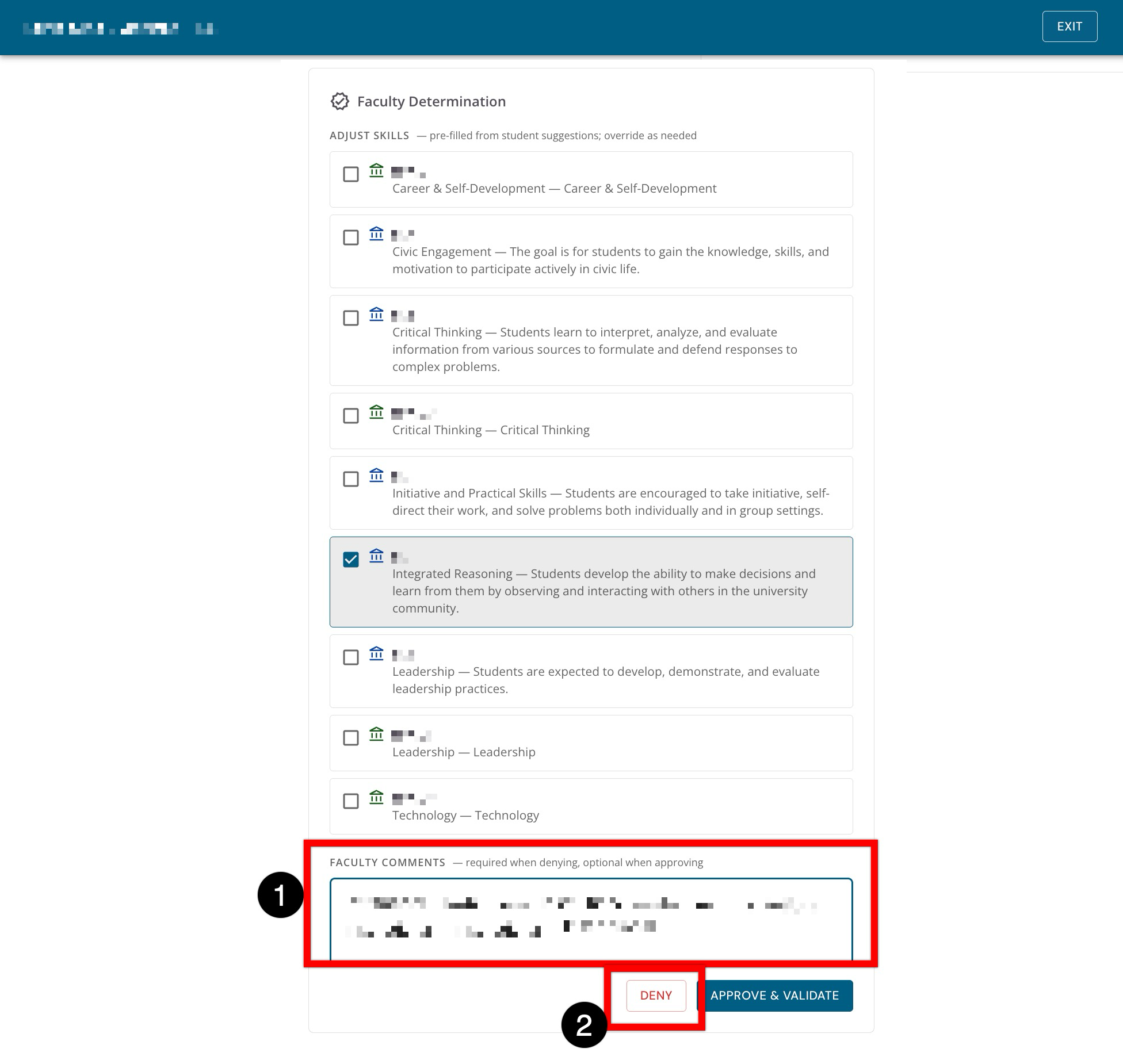
Comments are required when denying evidence to provide students with feedback they can use to revise and resubmit the evidence. Enter details in the Faculty Comments section (1) explaining why the evidence is being denied and click Deny to reject the submission (2).
-