
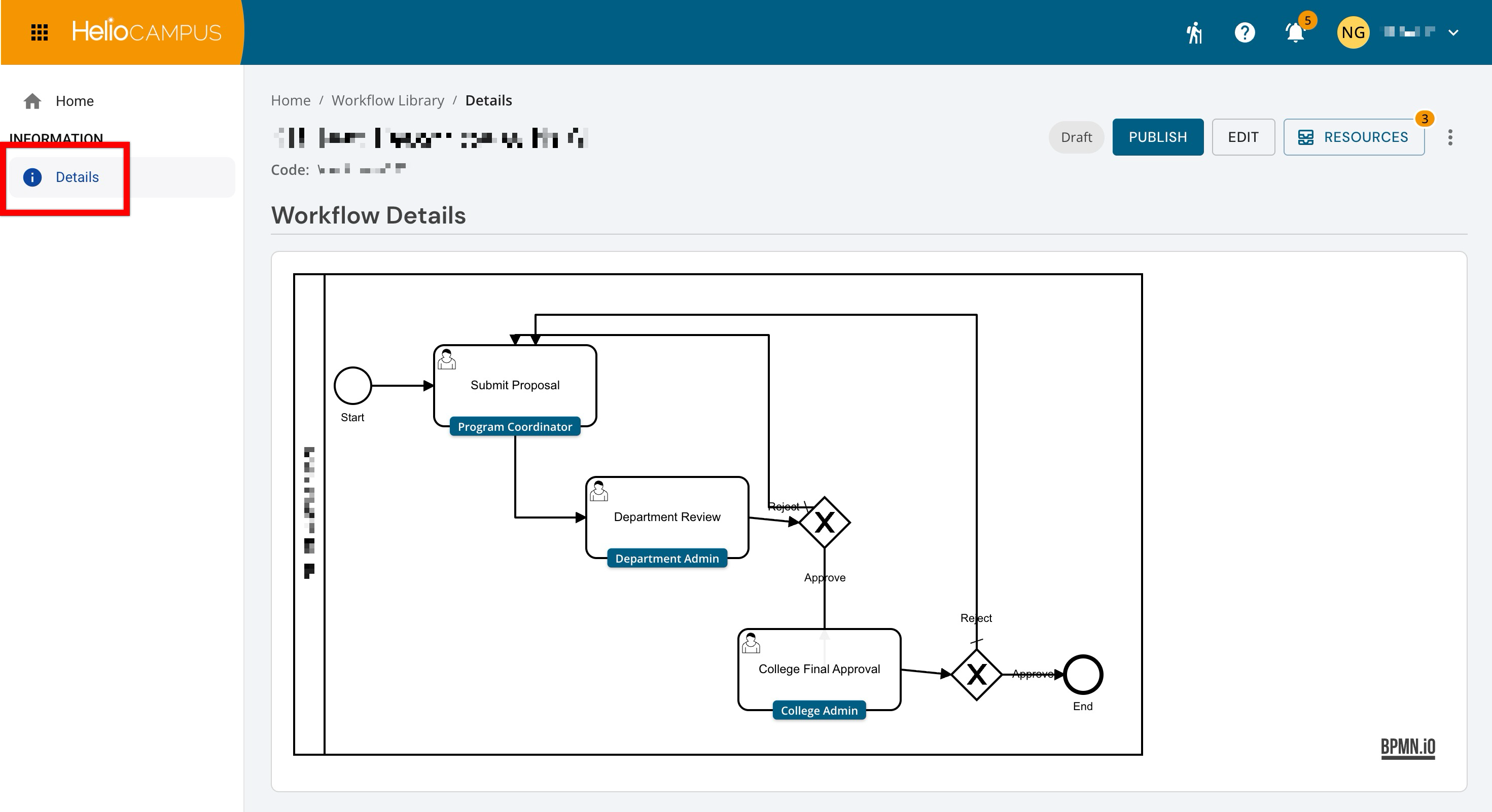
The Workflow Details page is read-only and visually represents a workflow’s steps, assigned roles, and routing paths. Use this page to understand how a form moves between participants, where approval decisions occur, and what happens when a submission is returned for revision. The page displays the workflow diagram from start to finish, with branching paths that show how actions such as approval or rejection determine the next step.
Downstream & Cross-Platform Impacts
-
Review Order: The sequence of steps determines which participant acts first, next, or last.
-
Role Responsibilities: The role assigned to each step identifies who is expected to complete that task.
-
Form Routing: Approval and rejection paths determine whether a form advances, returns for revision, or reaches the end of the workflow.
Considerations
-
Configuration Versus Progress: Use the diagram to understand the workflow’s structure. Use a collection’s Workflow Status page to monitor forms as they move through the steps.
-
Return Paths: A rejection may return a form to an earlier submission step rather than the immediately preceding reviewer. Trace each route carefully.
Best Practices
-
Review the complete diagram before publishing or changing a workflow.
-
Use clear step names that describe the action participants should take.
-
Confirm that each assigned role matches the intended responsibility.