The data collection Details page provides a centralized view of the configuration and administrative information for a specific data collection instance. It helps authorized administrators confirm that the collection is set up correctly, understand who owns and participates in it, and manage eligibility details before and during the collection period. The Details page stores and displays instance-level information used to administer the collection, while the schedule provides the underlying structure and default settings. An Institution, College, or Department can own data collections. Ownership determines which administrators can manage instance details:
-
Institution Admins can manage all Data Collections
-
College Admins can manage collections owned by their college or associated departments
-
Department Admins can manage collections owned by their department.
Dates and other defaults come from the data collection schedule and may be editable on the instance based on its status and the user’s permissions.
Considerations
-
Ownership Scope: Assign college or department ownership only when that unit is the appropriate administrative owner. If multiple colleges or departments will use the collection, Institution ownership may provide more appropriate oversight.
-
Schedule Inheritance: Instance defaults come from the schedule. When making changes, decide whether they should apply only to the current instance or be addressed in the schedule for future cycles.
Best Practices
-
Confirm ownership matches the collection's organizational scope.
-
Use schedule-level changes for recurring defaults and instance-level changes for exceptions limited to one collection cycle.
-
Document significant mid-cycle changes with notes or action items.
-
Review reporting outputs after completion to identify improvements for future schedules and workflows.
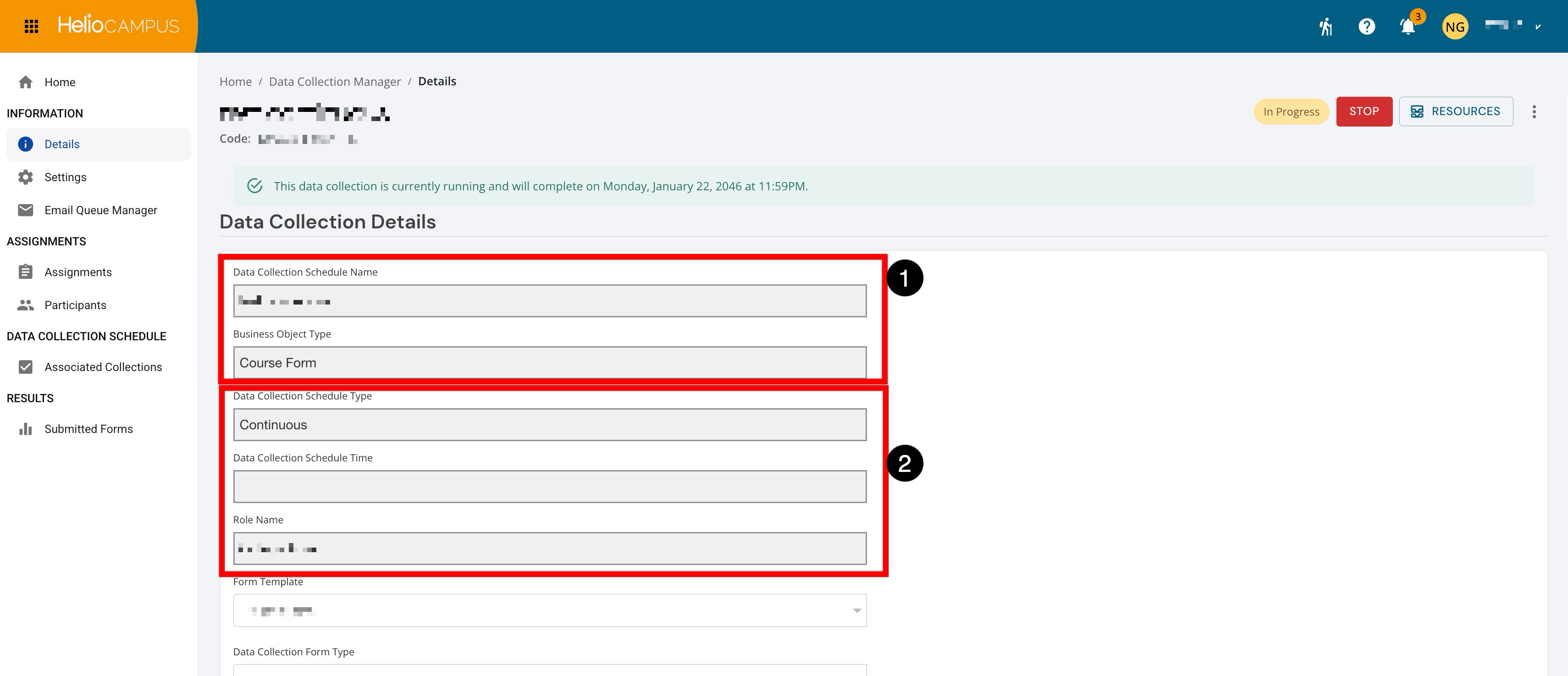
The Data Collection Schedule Name identifies the schedule that generated the collection, while the Business Object Type identifies the type of record the forms are collecting data about, such as a course, program, or organizational unit (1). In this example, it is Course Form. The Data Collection Schedule Type indicates how the schedule generates data collections (2). In this example, Continuous means the schedule supports an ongoing or recurring collection process. The Data Collection Schedule Time displays the configured timing or cycle associated with the schedule (2). The field is blank in this example because the collection type is Continuous. Role Name identifies the user role associated with the collection’s form assignment or workflow participation. This user will have access to form history and will receive the Data Collection Invitation notification on the Settings page.
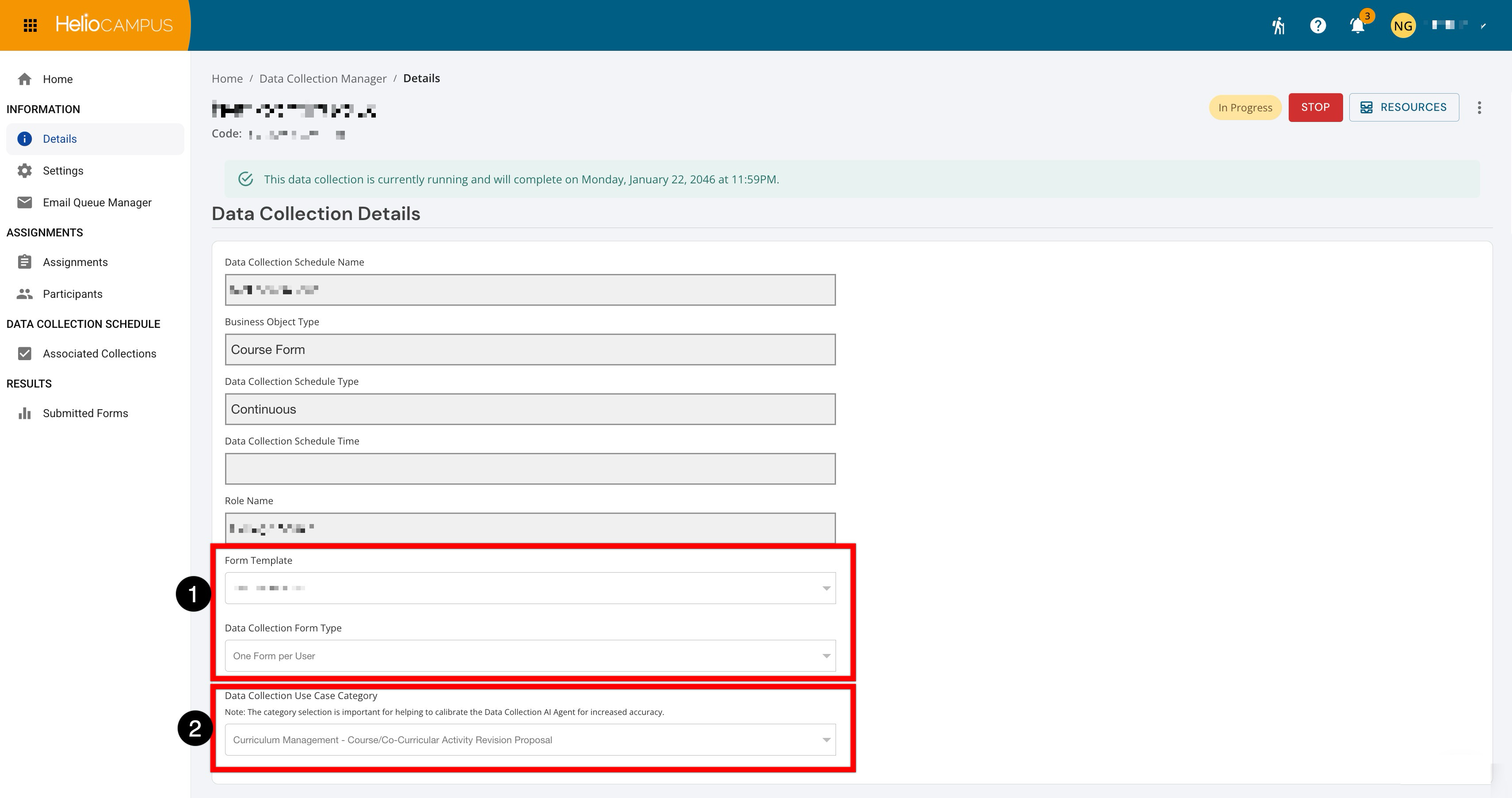
The Form Template field is used to select the form used to collect responses (1). The chosen template determines the sections, questions, instructions, and response fields presented to participants. The Data Collection Form Type determines how forms are generated and assigned for the collection (1). In the example, One Form per User creates a separate form for each assigned participant, so every user submits an individual response. The Data Collection Use Case Category classifies the collection's purpose, such as curriculum management, assessment, accreditation, or another institutional process (2). The selected category helps calibrate the platform AI, so its assistance is more relevant and accurate for the use case.
Data Collection Schedule Type
The Data Collection Schedule Type field provides three options:
-
Continuous: Indicates the collection is not tied to a term or academic-year cycle. It supports an ongoing collection process, so the Data Collection Schedule Time field may be blank.
-
Term: Indicates the collection is associated with an academic term. The Schedule Time identifies when in the term it occurs, such as the beginning, middle, or end.
-
Academic Year: Indicates the collection is associated with an academic-year cycle. The Schedule Time further identifies the configured point within that cycle.
In short, the type communicates the calendar cycle used to generate and organize the data collection. It inherits from the schedule and appears as read-only on the collection Details page.
Data Collection Form Types
The selected business object or collection configuration may restrict the available form-type options. For example, some specialized data collection types support only one form type. This field has three options:
-
One Form per User: Creates a separate form for every user assigned the role in the first workflow step. For example, two Program Coordinators assigned to the same program receive two independent forms.
-
One Form per Business Object: Creates one form for each applicable business object, such as a program, course, department, or course section. The first assigned user who opens the form becomes its sole user and is responsible for completing and submitting it.
-
One Form per Business Object (multi-user): Creates one shared form for each business object. All assigned users can access, edit, and collaborate on that form. The platform alerts users when a response has already been submitted and asks whether answers should be overwritten.
Form Responses Will Be Confidential
The Form Responses Will Be Confidential setting controls how access to submitted form responses is handled. It controls response visibility, not whether a response is anonymous. It also does not change the form’s questions, assignments, or workflow. The specific users who retain access can depend on the collection’s workflow, ownership, and configured permissions.
|
Enabled |
Responses use the collection’s normal role- and workflow-based visibility. Authorized administrators, form owners, and reviewers may view responses according to their existing access and the collection’s organizational ownership. |
|
Disabled |
Responses are treated as confidential, and their visibility is restricted to only users authorized to access confidential submissions. Users should not assume that everyone who can access the Data Collection Manager can view the response content. |
Data Collection Participant Groups
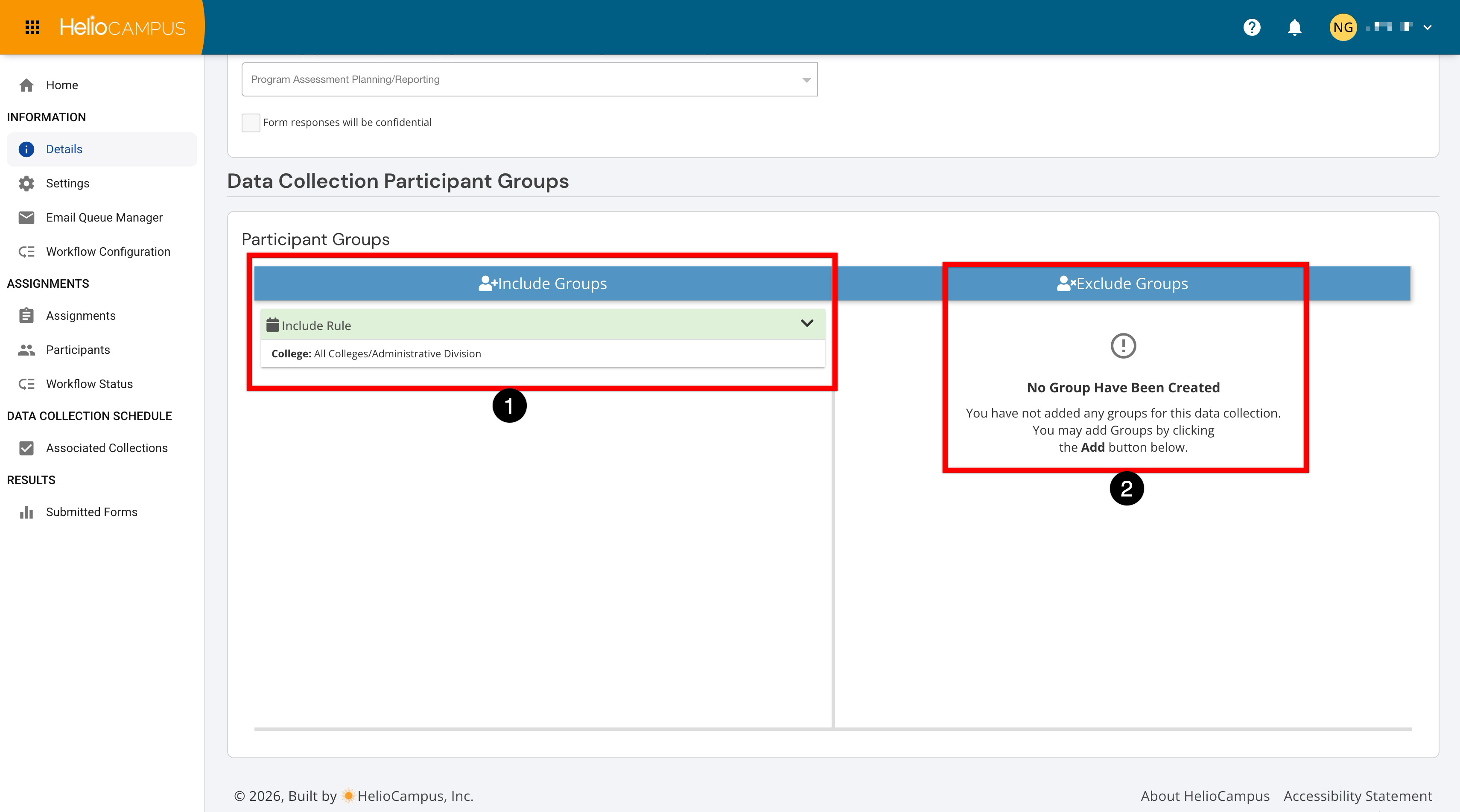
Participant groups are inherited from the collection schedule to determine which organizational groups receive or are associated with a data collection. Participant groups are separate from the collection owner. Groups determine who receives or is associated with forms, while ownership determines who can manage the collection’s administrative settings.
|
Section |
Details |
|---|---|
|
Include Groups |
Identifies the groups that should receive the collection form. |
|
Exclude Groups |
Identifies groups that should not receive the form, even if they otherwise match the inclusion rule. The message “No Groups Have Been Created” means no exclusions have been configured. |
The platform first identifies groups through the Include Groups rules (1), then removes any groups listed under Exclude Groups (2). For example, as shown below:
-
Include: All Colleges/Administrative Divisions
-
Exclude: None
This means the collection is intended for all colleges or administrative divisions, rather than a specific college. If the Institution later adds another college or administrative division, it may also be included under this broad rule by editing the Exclude Groups of the associated collection schedule.
⚠️ Participant groups can’t be changed once the schedule is published on the production site - this means if the information is incorrect, the collection must be deleted and re-created.